A clear comparison of IT support plans
Compare fixed monthly and pay-as-you-go IT support, current Genius Fixers pricing, included services and cost examples for your business.
Choose based on responsibility and support demand
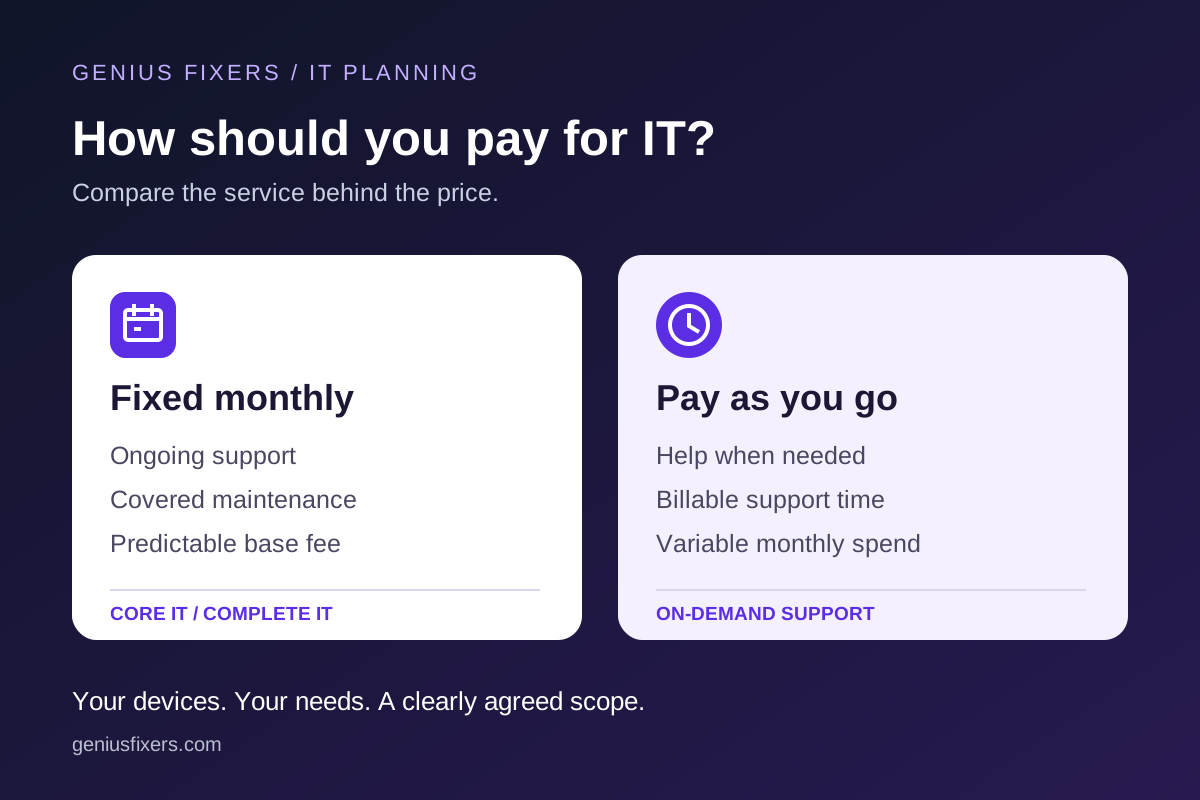
Pay-as-you-go support works well for occasional needs when routine IT care already has an owner. A fixed monthly plan suits businesses that want ongoing support and management for a defined environment. Compare included work, exclusions and expected demand before choosing.
What is pay-as-you-go IT support?
With pay-as-you-go support, you request help when you need it and pay for the work performed. It suits a business with occasional technical problems or an internal team that needs outside help for a defined task.
Genius Fixers charges $150 per hour, billed in 15-minute increments, for workstation and server support. One increment is $37.50; a 20-minute fix bills as 30 minutes, or $75. There is no required monthly support commitment. Describe the problem and agree the work before it begins.
The advantage is flexibility: you do not pay a recurring support fee during a quiet month. The tradeoff is variable spending. A month with several device failures, account issues or network problems can cost much more than the month before.
An hourly arrangement also needs a named owner for routine updates, security tools and backup checks. Requesting a repair does not automatically create an ongoing monitoring or maintenance service.
What is a fixed monthly IT plan?
A fixed monthly plan covers an agreed set of ongoing IT responsibilities for a recurring price. That gives a business a more predictable support budget and a team responsible for the covered maintenance and support work.
At Genius Fixers, monthly pricing is based on covered workstations and scope. Core IT starts at $125 per workstation per month for 5–10 workstations. It includes unlimited remote help desk and network operations support within the agreed scope, monitoring, PC and Mac updates, managed endpoint protection, email and web security, Microsoft 365 or Google Workspace administration, employee onboarding and offboarding, and IT planning.
Complete IT starts at $150 per workstation per month for 5–10 workstations. It adds vulnerability scanning and management, security awareness and phishing training, an annual security risk assessment and a prioritized improvement plan.
Volume rates decrease to $99 for Core IT and $125 for Complete IT at 100 or more workstations. Fewer than five workstations requires a custom quote. A fixed monthly fee applies to the agreed environment; adding devices or services can change the total.
Fixed monthly vs pay-as-you-go: side-by-side comparison
| Decision | Pay as you go | Fixed monthly |
|---|---|---|
| How you pay | $150/hour in 15-minute increments for support work. | Per-workstation monthly price, plus agreed additional services. |
| Budget pattern | Varies with the work requested. | Predictable base for the covered devices and scope. |
| Everyday support | Request and pay for help as needed. | Remote help desk support included within the agreement. |
| Routine maintenance | Assign internally or arrange separately. | Covered monitoring, patching and workstation management included. |
| Security | Ongoing security responsibilities need a separate arrangement. | Core protection included; Complete adds training, vulnerability and risk work. |
| Best fit | Occasional needs or a team that already manages routine IT. | A business that wants ongoing support, maintenance and clearer accountability. |
What costs extra?
Compare the full quote, including the parts outside the base plan. Current Genius Fixers pricing lists:
- Server management: $299 per server per month.
- Firewall management: $99 per firewall per month; hardware and licenses are separate.
- On-site visits: $65 per visit within 50 miles of the Manassas office. Visits outside that area are quoted separately. For hourly work, the visit charge is additional to billable support time.
- Backup, hardware, software licenses and projects: scoped separately unless specifically included in your written agreement.
Administration of Microsoft 365 or Google Workspace does not mean the subscription licenses are included. Similarly, endpoint protection does not replace a separately defined backup and recovery service. Confirm covered data, retention and restore responsibilities when adding backup.
A practical cost example: ten workstations
Consider an illustrative business with ten workstations. At the published starting rates, Core IT has a $1,250 monthly workstation base; Complete IT has a $1,500 monthly workstation base.
| Illustrative arrangement | Calculation | Monthly charge |
|---|---|---|
| Hourly: 2 billable hours | 2 × $150 | $300 |
| Hourly: 6 billable hours | 6 × $150 | $900 |
| Hourly: 10 billable hours | 10 × $150 | $1,500 |
| Core IT: 10 workstations | 10 × $125 | $1,250 |
| Complete IT: 10 workstations | 10 × $150 | $1,500 |
These are different service packages. Ten hourly support hours and a Complete IT workstation plan have the same price in this example, but they do not provide identical coverage. The monthly plan includes specified ongoing management and protection. The hourly figures represent billable work only and do not assume how much support your business will need.
Review three to six months of support invoices, then add what you already spend on monitoring, maintenance and security. Compare that total with a quote covering the same work. Keep downtime and employee disruption visible as business considerations without assuming a monthly plan guarantees savings or eliminates outages.
Which plan should your business choose?
Pay as you go is a reasonable fit when problems are infrequent, you can tolerate variable support spending, and someone already owns updates, accounts, security and backup verification. It can also suit a specific troubleshooting task that needs a clear beginning and end.
A monthly plan is worth considering when staff need help regularly, recurring IT work falls on the owner or office manager, new hires need consistent setup, or you want ongoing maintenance with clear accountability. Choose Core or Complete based on the security work you need included.
Before deciding, ask:
- Which workstations, servers, locations and applications are covered?
- Who handles updates, security alerts, backup checks and employee access changes?
- What support hours, response targets and escalation steps apply?
- Which visits, projects, licenses and recovery work are billed separately?
- How will the monthly fee change when we add or remove devices?
A response target describes when a request receives attention; it is different from a promise that every issue will be resolved within that time. Put the applicable service commitments in the agreement.
Find the right support plan with Genius Fixers
Genius Fixers supports businesses across Virginia, Maryland and Washington, DC from Manassas. Bring your workstation count, recent support spending and recurring problems to a free introductory consultation. We can compare hourly support with a Core IT or Complete IT quote for your actual needs.
View current plans and pricing, explore our managed IT services, or call (703) 419-9000. You can also email info@geniusfixers.com.
Pricing checked October 28, 2026 against Genius Fixers' published pricing and FAQ. Examples are illustrative; your written quote confirms scope, applicable charges and service terms.
Frequently asked questions
Is pay-as-you-go IT support cheaper than a monthly plan?
It can cost less when support needs are occasional. Compare several months of billable work and the separate cost of maintenance, security and backups with a monthly quote covering the same responsibilities.
Does a fixed monthly plan include every IT expense?
No. The monthly price covers the agreed devices and services. Servers, firewalls, backup, on-site visits, hardware, software licenses and projects may add costs. Review the written scope before comparing totals.
What is the difference between Core IT and Complete IT?
Both provide ongoing support and protection within the agreed scope. Complete IT also includes vulnerability management, security awareness and phishing training, an annual security risk assessment and an improvement plan.
Can we start with hourly support and move to a monthly plan?
Yes. Genius Fixers allows clients to move from pay-as-you-go support to a monthly plan. Agree the covered devices, services, onboarding work and start date before the change.