Quick answer: same price ladder, so choose by apps, devices and compliance
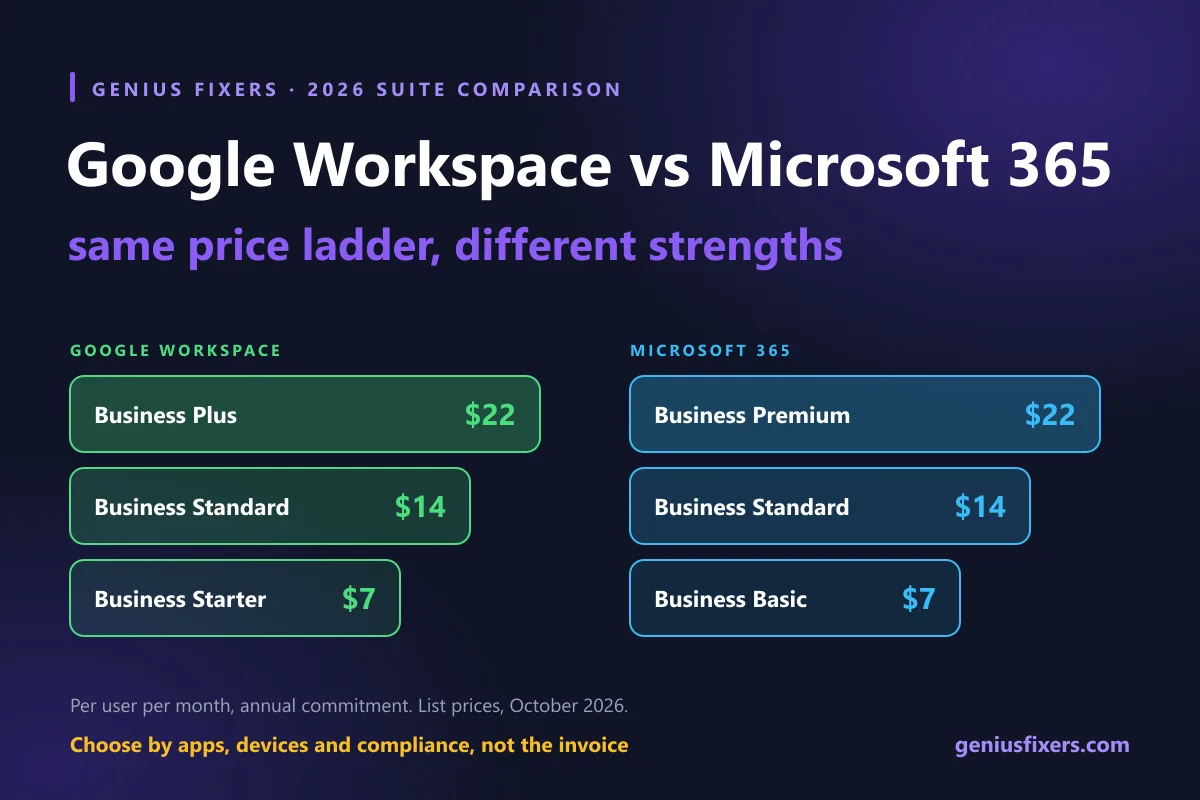
The two suites now cost the same: $7, $14 and $22 per user. See what each tier includes, the security gaps and how to pick for your VA, MD or DC office.
Microsoft 365 for Windows and desktop Office, Google Workspace for browser-first teams
For most small businesses, Google Workspace vs Microsoft 365 is no longer a price decision. Since Microsoft's July 1, 2026 price change, both suites list at $7, $14 and $22 per user per month on annual terms. Pick Microsoft 365 if you run Windows PCs, desktop Office files or industry software. Pick Google Workspace if your team works in the browser and wants simpler admin.
The 2026 price ladder is now identical
On July 1, 2026, Microsoft raised Business Basic from $6 to $7 and Business Standard from $12.50 to $14, and left Business Premium at $22. Google's Business editions already sat at $7, $14 and $22. The result is a three-step price ladder that matches almost to the cent. When we set up either suite as part of managed IT services, the questions that decide it are about apps, devices and compliance, not the invoice.
| Tier | Google Workspace | Microsoft 365 | Key difference at this tier |
|---|---|---|---|
| Entry ($7) | Business Starter: 30 GB pooled storage per user, 100-person Meet calls | Business Basic: 100 GB mailbox, 1 TB OneDrive, web and mobile Office apps only | Microsoft gives far more storage; neither includes desktop apps |
| Middle ($14) | Business Standard: 2 TB pooled per user, 150-person Meet calls | Business Standard: desktop Word, Excel, PowerPoint and Outlook | Desktop Office apps are the reason most offices choose Microsoft here |
| Top ($22) | Business Plus: 5 TB pooled per user, Google Vault, advanced endpoint management | Business Premium: Intune Plan 1, Defender for Business, Defender for Office 365 Plan 1, 1.5 TB archive | Microsoft bundles endpoint security; Google bundles retention and Windows device management |
Both vendors cap these business plans at 300 users. Both also charge about 20% more if you pay month to month: Google lists flexible prices of $8.40, $16.80 and $26.40 and says the annual commitment saves 16%, and Microsoft prices monthly billing about 20% higher too. For a 15-person office on the middle tier, that is $2,520 a year on annual terms versus $3,024 on flexible billing.
Google Workspace vs Microsoft 365 at the $22 tier: what you actually get
The top tier is where the two products split. Both cost $22 per user. They protect different things.
- Microsoft 365 Business Premium adds Intune Plan 1 for Windows, Mac and phone management, Microsoft Defender for Business for endpoint detection and response, Defender for Office 365 Plan 1 for email link and attachment protection, information protection with data loss prevention for email and files, and advanced identity and access controls.
- Google Workspace Business Plus adds Google Vault for retention, eDiscovery and legal holds, and advanced endpoint management, which is the first Google tier that can manage Windows devices. Business Starter and Business Standard only get fundamental endpoint management.
- The gap on Google: Business Plus does not include an endpoint detection and response (EDR) tool. A Google office still needs separate managed EDR on every laptop and desktop.
- The gap on Microsoft: Business Premium only pays off if someone configures Intune policies, conditional access and Defender alerts. Licenses that sit unconfigured protect nothing.
Worked example: a 15-person office in Northern Virginia
Take a 15-person professional office in Fairfax with Windows laptops, a shared drive and one accounting app that runs on the desktop. Here is the annual license math on list prices.
| Scenario | Plan | Per user | Annual total |
|---|---|---|---|
| Email and files only | Either suite, middle tier | $14 | $2,520 |
| Windows device management required | Google Business Plus or Microsoft Business Premium | $22 | $3,960 |
| Same, paid month to month | Either suite, top tier | $26.40 | $4,752 |
At $3,960 the license bills match, but the Google office still has no EDR in that number, while the Microsoft office does. If you already pay for EDR through a managed IT plan, that difference shrinks. Our Core IT plan includes managed EDR and admin for either Microsoft 365 or Google Workspace, so the choice can rest on how your team works rather than on bundled security.
A five-question decision test
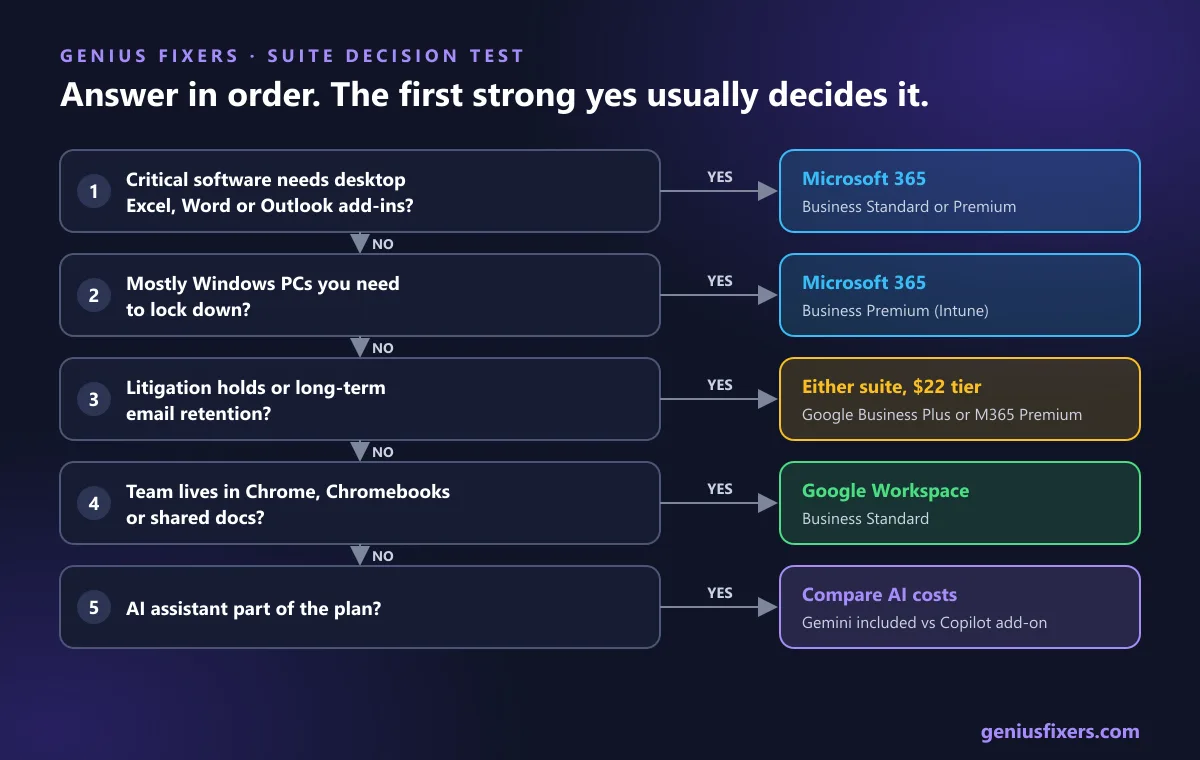
Answer these in order. The first strong yes usually decides it.
- Does any critical software need desktop Excel, Word or Outlook? Add-ins, macros, practice management or accounting tools that plug into Office point to Microsoft 365 Business Standard or Premium.
- Are most of your computers Windows PCs you need to lock down? Microsoft Intune is built for this. On Google you need Business Plus before you can manage Windows at all.
- Do you need litigation holds or long-term email retention? Google Vault is only included from Business Plus. Microsoft Business Premium includes a 1.5 TB archive per user. Law firms should price the top tier of either suite.
- Does the team live in Chrome, Chromebooks or shared docs? Google Workspace's real-time editing in Docs and Sheets is simpler to administer, and many offices need less training.
- Is AI part of the plan? Gemini is included in Google's Business plans. Microsoft includes Copilot Chat, but the full Microsoft 365 Copilot Business add-on lists at $21 per user per month on annual terms, sometimes discounted by promotion.
| Office type | Usual best fit | Why |
|---|---|---|
| Dental or medical practice | Microsoft 365 Business Premium | Windows imaging and practice software, device control and email protection in one license |
| CPA or tax firm | Microsoft 365 Business Standard or Premium | Desktop Excel and the Outlook and Excel add-ins that tax and accounting software rely on |
| Small law firm | Either suite at the $22 tier | Retention and legal hold need Vault (Google) or the Premium archive and protection features (Microsoft) |
| Agency, startup or nonprofit on Chromebooks | Google Workspace Business Standard | Browser-first teams, shared Drive files, Gemini included |
We support both stacks for dental practices, law firms and other offices across Virginia, Maryland and Washington, DC.
HIPAA and compliance: both sign a BAA, neither makes you compliant
Healthcare offices ask this first. Microsoft says its HIPAA Business Associate Agreement is available by default through the Microsoft Online Services Data Protection Addendum to customers that are covered entities or business associates. Google offers its BAA for electronic acceptance by an administrator in the Admin console, and the record appears under Account settings, then Legal and compliance.
Two warnings apply to both. Only the services named as in scope are covered, and third-party add-ons are not. And as Microsoft states plainly, using the service does not on its own make you HIPAA compliant. You still need a risk analysis, MFA, access reviews and backups. Turn on MFA for every account before you migrate a single mailbox.
What switching really involves
Moving from Google Workspace to Microsoft 365 is common in offices that outgrow browser-only tools. Microsoft's automated Google Workspace migration in Exchange Online moves mail, rules, calendars and contacts. It does not move shared calendars, room bookings, vacation or auto-reply settings, or event colors, and it migrates at most three email addresses per contact. The default limit is 35 MB per message, which you can raise to 150 MB. Drive files need a separate plan.
- Week 1: Inventory users, shared drives, groups, and every app that signs in with Google or Microsoft accounts.
- Week 2: Turn off retention and archive policies on the target as Microsoft recommends, then run a pilot batch of two or three mailboxes.
- Week 3: Move files, rebuild sharing permissions, and migrate the rest of the mailboxes in batches.
- Cutover weekend: Switch MX records, re-enroll devices and confirm phones sync. Keep the old tenant read-only for 30 days.
Permissions are where moves go wrong. Our guide on SharePoint permissions covers the Microsoft side. Whichever suite you choose, neither one replaces a real backup, so read why Microsoft 365 still needs its own backup before go-live. If you want a second opinion on the plan, our IT consulting team scopes migrations in writing first.
How Genius Fixers manages either suite
From our office in Manassas we run managed IT for businesses in Northern Virginia, Maryland and Washington, DC. Microsoft 365 or Google Workspace administration is part of Core IT, which starts at $125 per workstation per month, alongside unlimited remote help desk, patching, managed EDR and onboarding. On-site visits are $65 within 50 miles of Manassas.
Not sure which suite fits your office, or whether your current licenses are the right tier? Book a free 10-minute call and we will review your users, apps and devices with you.
Frequently asked questions
Is Google Workspace cheaper than Microsoft 365?
Not at list price in 2026. Both suites charge $7, $14 and $22 per user per month on annual terms for their three business tiers, and both cost about 20% more on month-to-month billing.
Which is better for a small business, Google Workspace or Microsoft 365?
Microsoft 365 fits offices that run Windows PCs, desktop Office files or industry software that plugs into Outlook or Excel. Google Workspace fits browser-first teams that want simpler sharing and administration.
Does Google Workspace include desktop Office apps?
No. Google Workspace runs in the browser and mobile apps. Users can open and edit Office files in Docs, Sheets and Slides, but complex Excel macros and Office add-ins work best in desktop Microsoft 365 apps.
Is Google Workspace or Microsoft 365 better for HIPAA?
Both offer a HIPAA Business Associate Agreement. Microsoft includes it through its Data Protection Addendum, and Google offers it for acceptance in the Admin console. Neither makes a practice compliant without a risk analysis and proper security settings.
What does Microsoft 365 Business Premium include that Google Business Plus does not?
Business Premium includes Microsoft Intune Plan 1, Microsoft Defender for Business endpoint protection and Defender for Office 365 Plan 1. Google Business Plus includes Google Vault and advanced endpoint management but no EDR tool.
Can I migrate from Google Workspace to Microsoft 365 without losing email?
Yes. Microsoft's automated migration moves mail, rules, calendars and contacts from Google Workspace into Exchange Online. Shared calendars, room bookings, vacation settings and Drive files need separate steps.
Do Google Workspace and Microsoft 365 include AI?
Google includes Gemini in its Business plans. Microsoft includes Copilot Chat, while the full Microsoft 365 Copilot Business add-on lists at $21 per user per month on annual terms, sometimes discounted by promotion.
Sources
- Google Workspace: Plans and pricing
- Microsoft 365 business plans and pricing (with Teams)
- Microsoft: Compare all Microsoft 365 business products
- Microsoft 365 Blog: Advancing Microsoft 365, new capabilities and pricing update
- Google Workspace Admin Help: Compare Google endpoint management feature sets
- Google Workspace Admin Help: Buy Vault licenses for your organization
- Google Workspace Admin Help: HIPAA compliance with Google Workspace and Cloud Identity
- Microsoft Learn: HIPAA and HITECH Act compliance offering
- Microsoft Learn: Automated Google Workspace migration to Exchange Online overview
Last reviewed October 23, 2026 by the Genius Fixers IT Team, Manassas, VA.