
Quick answer: three copies, two storage types, one off-site
The 3-2-1 backup rule, explained with a real 15-person office example, a 10-point self-audit and a quarterly restore test for VA, MD and DC businesses.
Add one locked copy and prove it with a restore test
The 3-2-1 backup rule means keeping three copies of your data, on two different types of storage, with one copy stored off-site. The newer 3-2-1-1-0 version adds one copy that is offline or immutable, so ransomware cannot change or delete it, and zero errors when you test a restore. For a small office that usually means the live data, a local backup device and a locked cloud copy. The worked example, self-audit and quarterly restore test below show how to check yours.
What the 3-2-1 backup rule means, number by number
The rule is easy to say and easy to get slightly wrong. Each number protects you from a different kind of failure, so skipping one leaves a specific gap.
| Number | What it requires | What it protects you from |
|---|---|---|
| 3 copies | Your live data plus two backups | A single backup that turns out to be corrupt or incomplete |
| 2 storage types | For example, a local backup appliance or NAS plus cloud object storage | One type of storage failing the same way at the same time |
| 1 off-site | At least one copy in a different building or data center | Fire, flood, theft or a burst pipe in your office |
| +1 offline or immutable | A copy that cannot be changed or deleted for a set period, even by an admin account | Ransomware or a stolen admin password wiping your backups |
| +0 errors | Restores are tested and verified, not assumed | Finding out on the worst day that backups never worked |
The original rule was written for hardware failure and disasters. The two extra numbers exist because attackers now go after backups first. CISA's #StopRansomware Guide tells organizations to "maintain offline, encrypted backups of critical data" and to regularly test their availability and integrity. That is the 3-2-1-1-0 rule in government language.
A worked example: a 15-person office in Northern Virginia
Most guides stop at the definition. Here is what it looks like for a typical client: a 15-person professional office in Prince William County with one on-site file server, a line-of-business database, and Microsoft 365 for email and documents.
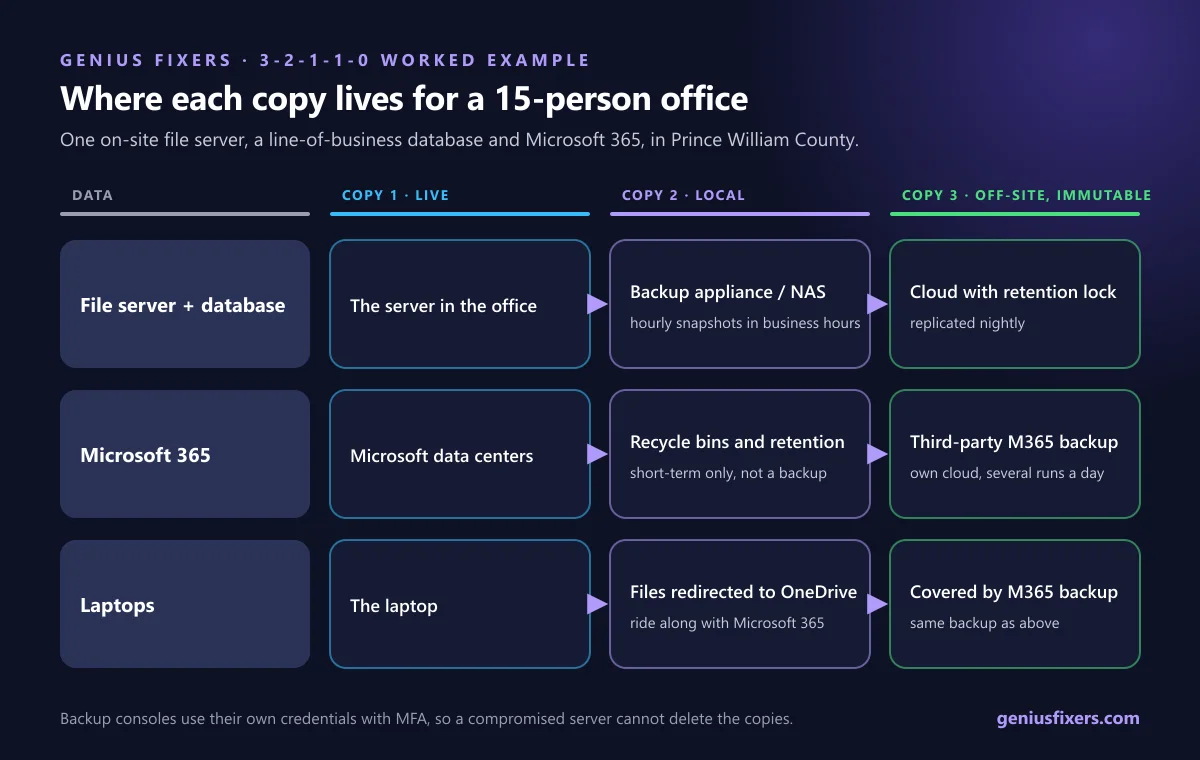
| Data | Copy 1 (live) | Copy 2 (local, fast restore) | Copy 3 (off-site, immutable) |
|---|---|---|---|
| File server and database | The server in the office | Backup appliance or NAS in a separate rack, image snapshots every hour during business hours | Replicated nightly to cloud storage with retention lock |
| Microsoft 365 (Exchange Online, OneDrive, SharePoint, Teams) | Microsoft's data centers | Microsoft's own recycle bins and retention (short-term only) | Third-party Microsoft 365 backup to a separate cloud, several times a day |
| Laptops | The laptop | Files redirected to OneDrive, so they ride along with Microsoft 365 | Covered by the Microsoft 365 backup above |
Two details make this work. First, the backup appliance uses its own credentials, not a domain admin account, so a compromised server cannot log in and delete it. Second, the cloud copy has a retention lock, so even someone with the backup password cannot shorten or erase recent restore points.
Why Microsoft 365 is not your second copy
Microsoft keeps your data available, but its recovery tools are short windows, not backups. Deleted SharePoint and OneDrive items stay in the recycle bin for 93 days. Permanently deleted Exchange Online email is kept 14 days by default, and an admin can raise that to a maximum of 30 days. If an employee deletes a folder in March and you notice in July, it is gone. Our guide to Microsoft 365 backup for small businesses covers this in more detail.
Turn your recovery targets into a backup schedule
Your backup frequency decides how much work you can lose. That window is called the recovery point objective (RPO). The math is simple: if you back up once a night, you can lose up to a full day of work.
| Backup frequency | Worst-case lost work | Typical fit |
|---|---|---|
| Once a night | Up to 24 hours | Archive shares, rarely changed files |
| Every 4 hours | Up to 4 hours | General office files |
| Every hour | Up to 1 hour | Accounting, practice management and case files |
| Every 15 minutes | Up to 15 minutes | Databases that staff update all day |
Ask one question per system: how many hours of re-entered work could we absorb? Set the schedule from the answer, and keep the local copy on the shortest interval, because local restores are the fastest way back to work.
Score your current setup in 10 minutes
Give yourself one point for each statement that is true today. Be strict: "I think so" counts as no.
- We have at least two backup copies of every critical system, not just the server.
- Those copies are on two different types of storage.
- At least one copy is outside our building.
- At least one copy is immutable or offline, and we have checked the retention lock is on.
- Backup consoles use separate accounts with multi-factor authentication.
- Microsoft 365 or Google Workspace data is backed up by a separate service.
- Laptops save work to a location that is backed up.
- Someone gets an alert when a backup job fails, and acts on it.
- We restored a real file and a full system within the last 90 days.
- We have written down how long a full restore takes.
A score of 9 or 10 means you meet 3-2-1-1-0. A score of 6 to 8 means you meet the basic 3-2-1 rule but are exposed to ransomware. Below 6, a single bad day could cost you your data.
The most common gap we find in local offices is item 5. Backups are often managed with the same admin password as the servers, which means an attacker who gets one gets both. Multi-factor authentication management closes that door.
A 30-minute quarterly restore test
The "0" in 3-2-1-1-0 only means something if you test. CISA's guide tells organizations to test backup procedures on a regular basis. Here is a short version a small office can run every quarter:
- Pick a file at random from a shared folder and restore it from last week's local backup. Open it and confirm it is the right version.
- Restore one deleted email from the Microsoft 365 backup, older than 30 days, so you prove you are beyond Microsoft's own window.
- Boot the server image from the backup appliance in an isolated test mode and confirm the database starts.
- Pull one restore point from the cloud copy and confirm the retention lock shows the expected date.
- Time each step and write the results down with the date and who ran the test.
- Fix anything that failed before the next business day, then retest that one item.
That written record is also what auditors and insurers ask for. Policy questionnaires often ask whether backups are offline and tested. Our article on cyber insurance for small businesses explains what underwriters look for.
How the 3-2-1 backup rule lines up with compliance
- HIPAA Security Rule. Section 164.308(a)(7) requires a data backup plan with "retrievable exact copies" of electronic PHI, plus a disaster recovery plan to restore any loss of data. See how we support healthcare practices.
- NIST Cybersecurity Framework 2.0. Outcome PR.DS-11 states that backups of data are created, protected, maintained and tested. The 3-2-1-1-0 rule covers all four verbs.
- Law firms and CPA firms. Client files carry retention duties, and a lost matter or tax file is a professional problem as well as an IT one. Read how we work with law firms.
One caution from CISA: immutable storage does not meet the compliance criteria of every regulation. Check your record-retention and deletion obligations before you set long lock periods.
Backups are the last line, not the only one
A good backup gets you back up after an attack. It does not stop the attack. Pair your backups with managed endpoint detection and response that can stop ransomware before it spreads, and work through our small business cybersecurity checklist for the rest of the basics.
How Genius Fixers sets up 3-2-1-1-0 backups in Virginia, Maryland and DC
From our office in Manassas, we design and run backups for businesses across Northern Virginia, Maryland and Washington, DC. Our backup and disaster recovery service covers the local device, the off-site immutable copy, Microsoft 365 backup, failure alerts and the quarterly restore test, with results written up for you.
- Cloud backup, on-site backup and Microsoft 365 backup are quoted to your data size and recovery targets, on top of a Core IT or Complete IT plan. See managed IT pricing.
- Core IT starts at $125 per workstation per month. Pay-as-you-go help is $150 per hour.
- On-site visits are $65 within 50 miles of Manassas, Monday to Friday, 8 AM to 5 PM ET.
Scored below 9 on the self-audit?
Book a free 10-minute call and we'll tell you which gap to close first.
Call 703-419-9000 or 1-800-949-6592 to review your backups.
Frequently asked questions
What is the 3-2-1 backup rule?
The 3-2-1 backup rule means keeping three copies of your data on two different types of storage, with one copy off-site. It protects you from a single device failure, a single storage type failing, and a disaster at your office.
What is the 3-2-1-1-0 backup rule?
It is the 3-2-1 rule plus one copy that is offline or immutable, and zero errors in restore testing. The extra copy stops ransomware from deleting your backups, and the testing proves you can actually recover.
Does cloud storage count as off-site?
Yes. A cloud backup in a provider's data center counts as the off-site copy. It should be a separate backup service with its own login, not a synced folder that mirrors deletions and encrypted files.
Is OneDrive or SharePoint a backup?
No. They sync and store files, and deleted items stay in the recycle bin for 93 days. A separate Microsoft 365 backup keeps older versions and survives an account compromise.
What is an immutable backup?
An immutable backup is a copy that cannot be changed or deleted until a set retention period ends. Even an administrator account cannot erase it early, which is why it defeats ransomware that targets backups.
How often should a small business test backups?
Test a file restore at least every quarter and a full system restore at least once or twice a year. Write down what you restored, how long it took and who ran the test.
Is an external USB drive enough for 3-2-1 backups?
A USB drive can be one copy, but only if it is unplugged and stored off-site between backups. A drive left plugged in gets encrypted along with everything else during a ransomware attack.
Sources
- CISA: #StopRansomware Guide
- NIST: The NIST Cybersecurity Framework (CSF) 2.0 (CSWP 29)
- eCFR: 45 CFR 164.308 Administrative safeguards (HIPAA Security Rule)
- Microsoft Support: Restore deleted items from the site collection recycle bin
- Microsoft Learn: Change how long permanently deleted items are kept for an Exchange Online mailbox
Last reviewed October 16, 2026 by the Genius Fixers IT Team, Manassas, VA.