Quick answer: Cat6a to the ceiling, Cat6 for short desk drops
Cat6 vs Cat6a explained for office build-outs: 10G distance limits, Wi-Fi 7 and PoE, conduit fill math, and a drop-by-drop plan for VA, MD and DC offices.
Decide drop by drop, not building by building
Cat6 is rated to 250 MHz and carries 10 Gbps only up to 55 meters, and as little as 37 meters in tightly bundled runs. Cat6a is rated to 500 MHz and carries 10 Gbps the full 100 meters. For a new office, pull Cat6a to access points, PoE cameras and long runs, use fiber between closets, and keep Cat6 for short desk drops. The spec table, drop-by-drop plan, conduit math and quote checklist below show how to scope it.
Cat6 vs Cat6a: the specs that matter
Both cables carry Gigabit Ethernet to 100 meters, so for a desk PC today you will not see a difference. The gap shows up at 10 Gbps, with high-power PoE, and in how much space the cable takes in walls and conduit. Here is what the standards and vendor documentation say:
| Spec | Cat6 | Cat6a |
|---|---|---|
| Rated frequency | 250 MHz | 500 MHz |
| 10GBASE-T distance | Up to 55 m, and as little as 37 m when bundled (TIA TSB-155) | Full 100 m channel |
| 2.5G / 5G (IEEE 802.3bz) | Up to 100 m | Up to 100 m |
| Alien crosstalk | Not specified to 500 MHz, so bundles limit 10G reach | Improved alien crosstalk specifications |
| Typical outside diameter | 0.21–0.24 in | 0.29–0.35 in |
| 3/4 in conduit at 40% fill | 5 cables | 3 cables |
| Best fit | Desk drops, phones, printers, short runs | Wi-Fi 7 APs, PoE cameras, long runs, anything you can't easily re-pull |
Cisco's 10GBASE-T cabling guidance spells out the key point. Category 6 is only specified to 250 MHz, and 10GBASE-T uses frequencies up to 500 MHz. That is why Cisco recommends Category 6A or better for new installations.
What the top guides skip: your office is not one cable decision
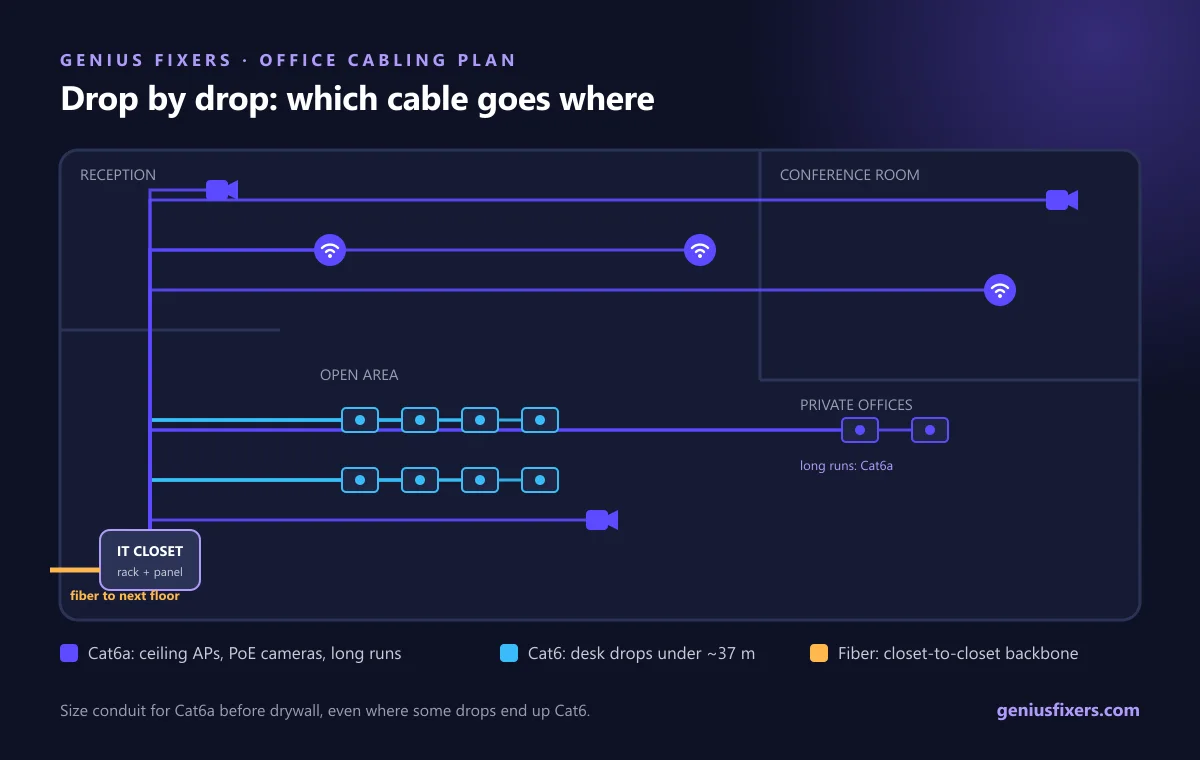
Most comparisons end with "Cat6a is better but costs more." That is true but not useful when you're signing a cabling quote. A real office has four kinds of drops, and each one has a different right answer. Decide drop by drop, not building by building.
| Drop type | Recommended | Why |
|---|---|---|
| Wireless access points | Cat6a | New Wi-Fi 7 APs ship with 10 GbE ports. Ubiquiti's UniFi U7 Pro XG, for example, has a 10/5/2.5/1 GbE port and runs on PoE+. |
| PoE cameras, door controllers, PoE lighting | Cat6a | TIA TSB-184-A recommends Category 6A or higher for new PoE installations, because bundled power raises cable temperature. |
| Runs over about 37 m, or long bundles | Cat6a | Past this point, bundled Cat6 can't be relied on for 10G. |
| Desk, phone and printer drops under about 37 m | Cat6 is acceptable | Desks rarely need more than 1 Gbps. 2.5G and 5G still run to 100 m on Cat6. |
| Closet-to-closet backbone between floors | Fiber | Copper tops out at 100 m. Fiber also avoids grounding issues between floors. |
This split is how our structured cabling for offices jobs are usually scoped. It puts the more expensive cable only where it pays off, and it keeps the ceiling drops, which are the hardest to re-pull later, ready for the next two hardware refreshes.
Wi-Fi 7 access points are the main reason to choose Cat6a
Access points used to be the easiest drop in the building. They are now the most demanding. Ubiquiti lists the U7 Pro XG radio rates at up to 5.7 Gbps on 6 GHz and 4.3 Gbps on 5 GHz, behind a single 10 GbE uplink. You won't hit those numbers every day. But an AP serving a conference room or open office can push its uplink past 1 Gbps, and the AP cable is the one you least want to replace.
AP drops also sit in the ceiling, often bundled with camera runs, and often far from the closet. Those are the exact conditions where Cat6 loses its 10G reach. If you are planning wireless access point installation as part of a build-out, make every AP drop Cat6a, and pull two to the busiest spots. If your Wi-Fi already drops out, read why office Wi-Fi keeps dropping first. Coverage and channel problems are more common than cable problems.
PoE: why heat favors Cat6a
Power over Ethernet sends DC power down the same pairs as data. Under IEEE 802.3bt, a switch can now source up to 90 W per port, with up to 71.3 W reaching the device. A small fraction of that power becomes heat in the cable, and heat builds up inside tight bundles.
- TIA TSB-184-A recommends Category 6A or higher for new PoE installations and suggests limiting PoE bundles to 24 cables.
- Heat raises insertion loss, which shortens the distance a link can run cleanly. Cat6a's larger construction handles it better.
- Cameras, badge readers, intercoms and PoE lighting all add up. A mid-size office can easily have dozens of powered drops in one ceiling path.
- Plan camera drops with your business security camera installation at the same time, so the PoE budget and cable bundles are designed together.
Conduit and pathway math most quotes miss
Cat6a is noticeably thicker. Black Box lists Cat6a at 0.29–0.35 inches outside diameter, versus 0.21–0.24 inches for Cat6. At a 40% fill ratio, a 3/4-inch conduit takes 3 Cat6a cables or 5 Cat6 cables. That changes the build plan, not just the material line:
| Room | Drops needed | Conduits with Cat6 | Conduits with Cat6a |
|---|---|---|---|
| Private office | 2 | 1 | 1 |
| Reception desk | 4 | 1 | 2 |
| Conference room (table, display, AP, camera) | 6 | 2 | 2 |
| Open area, 10 desks | 10 | 2 | 4 |
The fix is simple if you catch it during framing. Size conduit, sleeves and J-hooks for Cat6a now, even if some drops end up Cat6. Upsizing conduit before drywall is cheap. Opening finished walls later is not. Thicker cable also needs more room on the patch panel and in vertical cable managers, so plan the server rack and patch panel setup for Cat6a bend radius from day one.
A 6-point checklist before you sign a cabling quote
- Drop schedule by type. The quote should list each drop as AP, camera, desk or backbone, with the category for each. One line that says "80 drops Cat6" is a warning sign.
- Matching components. Cat6a cable on Cat6 jacks or patch panels will not certify as Cat6a. Jacks, panels and patch cords must all be rated for the same category.
- Certification test reports. Ask for a tester report for every link, tested to the category you paid for. This document is your proof if a link fails later.
- PoE bundle limits. Ask how the installer will keep PoE bundles small, in line with TSB-184-A's 24-cable suggestion.
- Ceiling rating. Ask whether your ceiling is an air-handling plenum. If it is, the cable must be plenum-rated, and the building inspector will check.
- Labels and as-builts. Both ends of every drop should be labeled and match a floor plan you keep. This saves hours on every future move, add or change.
Rule of thumb: if the drop is in the ceiling, powers a device, or runs longer than about 37 meters, pull Cat6a. If it's a short desk drop and the budget is tight, Cat6 is a reasonable choice.
When fiber beats both
Copper Ethernet is limited to a 100-meter channel no matter which category you choose. For links between floors, between buildings, or between a main closet and a remote one, fiber optic cabling gives you more distance, more headroom and no grounding problems. Most multi-floor offices end up with fiber backbone, Cat6a to the ceiling and a mix of Cat6 and Cat6a at the desk.
How Genius Fixers handles office cabling in Virginia, Maryland and DC
We plan and install office cabling from our office in Manassas for businesses across Northern Virginia, Maryland and Washington, DC. A typical build-out covers the drop schedule, Cat6a to APs and cameras, a clean rack, labeling and certified test results. After move-in, our network monitoring and management watches the switches and APs the cable feeds, so you see a failing port before your staff do.
Design firms that move large CAD and BIM files between workstations and a file server are where 10G desk drops often make sense. See how we support engineering and architecture firms.
Planning a build-out or renovation?
Book a free 10-minute call and we'll help you decide which drops need Cat6a before the walls close.
Call 703-419-9000 or 1-800-949-6592 to plan your office cabling.
Frequently asked questions
Is Cat6a worth it over Cat6 for an office?
Yes, for access points, PoE cameras and any run longer than about 37 meters. For short desk drops that only need 1 Gbps, Cat6 is still a reasonable, lower-cost choice.
How far can Cat6 run 10 Gbps?
Cat6 supports 10GBASE-T up to 55 meters, and TIA TSB-155 warns that worst-case bundling can cut that to 37 meters. Cat6a supports 10 Gbps over the full 100-meter channel.
Do Wi-Fi 7 access points need Cat6a?
Not strictly, but it is the safe choice. Many Wi-Fi 7 APs, such as the UniFi U7 Pro XG, have 10 GbE uplinks, and only Cat6a supports 10 Gbps at full distance in bundled ceiling runs.
Can Cat6 carry 2.5 Gbps or 5 Gbps?
Yes. IEEE 802.3bz (2.5GBASE-T and 5GBASE-T) runs up to 100 meters on Cat5e and Cat6, so existing Cat6 can often support multi-gig APs at 2.5 or 5 Gbps.
Is Cat6a better for PoE?
Yes. TIA TSB-184-A recommends Category 6A or higher for new PoE installations because power in bundled cables creates heat, and Cat6a's construction handles that heat better.
Can I use Cat6a cable with Cat6 jacks?
It will work, but the link will only perform and certify to the lowest-rated component, which is Cat6. To get Cat6a performance, the cable, jacks, patch panels and patch cords must all be Cat6a.
Does Cat6a need to be shielded?
No. Cisco lists 100-meter 10GBASE-T support for both shielded and unshielded Cat6a. Shielded cable is used where electrical noise is high, and it must be grounded correctly.
Sources
- Cisco: Deploying 10GBASE-T with Cisco Switches: Choose the Right Cabling
- Cisco Blogs: NBASE-T Alliance, IEEE 802.3bz approved (2.5G/5GBASE-T up to 100 m of Cat5e/6)
- Belden: How the new TSB-184-A standard supports PoE
- Texas Instruments: The New PoE Standard (IEEE 802.3bt power levels)
- Black Box: CAT6A and Beyond Cabling Explained (diameter and conduit fill)
- Ubiquiti: UniFi U7 Pro XG Tech Specs
Last reviewed October 12, 2026 by the Genius Fixers IT Team, Manassas, VA.