Quick answer: an early warning for leaked passwords, not a lock
What dark web monitoring finds, what it misses, and a triage table for the first 24 hours after an alert. For small businesses in Virginia, Maryland and DC.
Act on each alert by severity, within hours for infostealer and admin findings
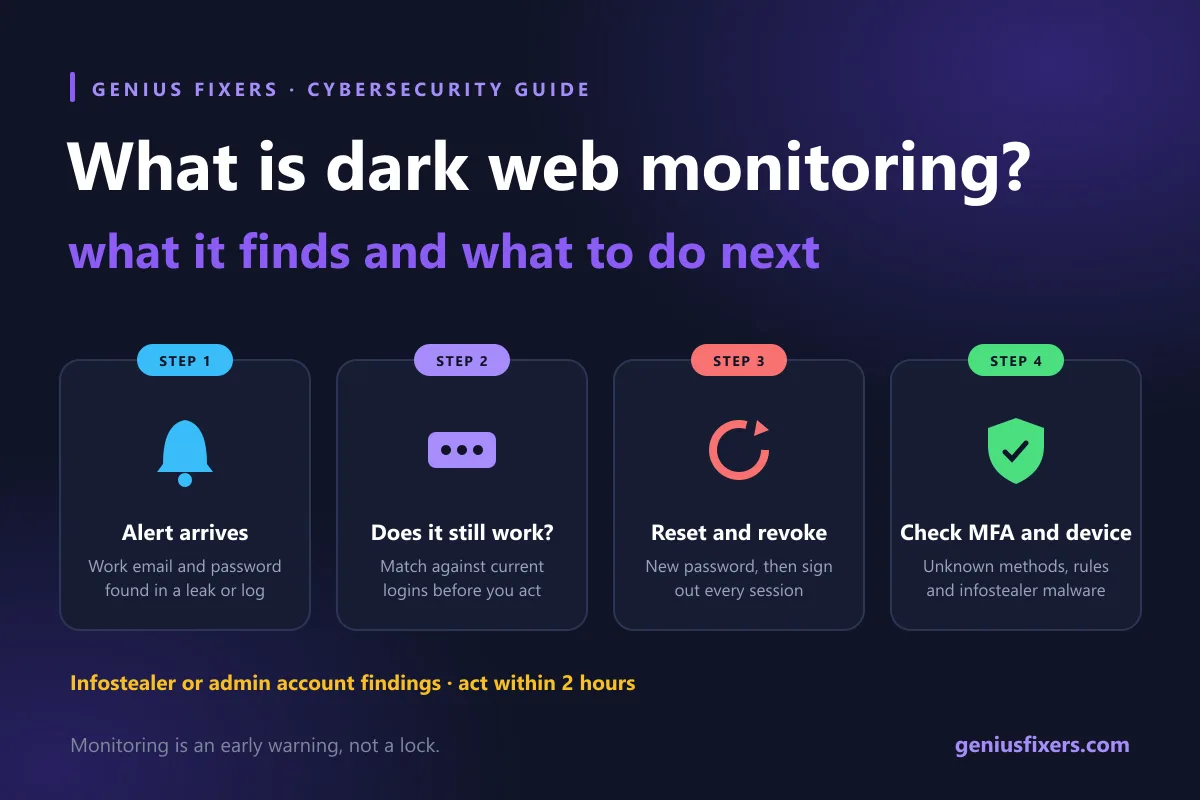
What is dark web monitoring? It is a service that continuously searches breach dumps, criminal forums, marketplaces and infostealer logs for your company's data, mainly employee email addresses and passwords, and alerts you when a match appears. It does not stop a breach. It gives you a head start to reset passwords, revoke sessions and check MFA before an attacker uses what leaked.
What is dark web monitoring, in plain terms
Criminals trade stolen data in places search engines do not index: Tor-based marketplaces, invite-only forums, paste sites and Telegram channels. A monitoring service collects that data, indexes it, and compares it against identifiers you give it, usually your email domain. When an address like jane@yourfirm.com shows up next to a password, you get an alert.
A dark web monitoring service is an early-warning system, not a lock. Its value depends on what your team does in the hours after an alert, the part most guides skip.
What dark web monitoring actually finds
| Finding | Where it usually comes from | What it tells you |
|---|---|---|
| Work email + password from an old breach | A third-party site (a vendor portal, a conference app) that was hacked years ago | Someone reused or may still use that password. Risk is high only if it matches a current login. |
| Work email + password from an infostealer log | Malware on a specific computer, often a home PC or personal laptop | A device was infected. Saved browser passwords and session cookies were likely taken, not just one password. |
| Email address only | Marketing lists, scraped directories | Expect more phishing aimed at that person. No password action needed. |
| Company name or domain in forum chatter | Access brokers, ransomware group posts | Rare for small firms, but treat as urgent and get help the same day. |
| Customer or client data | A breach of your systems or a vendor's | Possible legal notice duties. Call counsel before you do anything public. |
What it cannot do
- It cannot see everything. Private channels and data that has not been leaked or sold yet stay invisible to every vendor.
- It cannot tell you if the password still works. Most alerts show a password captured at some point in the past. You have to check whether it matches a current login.
- It cannot stop a login. Only controls on the account do that, such as strong passwords, multi-factor authentication and conditional access.
- It does not clean an infected computer. An infostealer finding means malware ran on a device, and only an endpoint investigation answers what else it took.
Dark web alert triage table: who does what in the first 24 hours
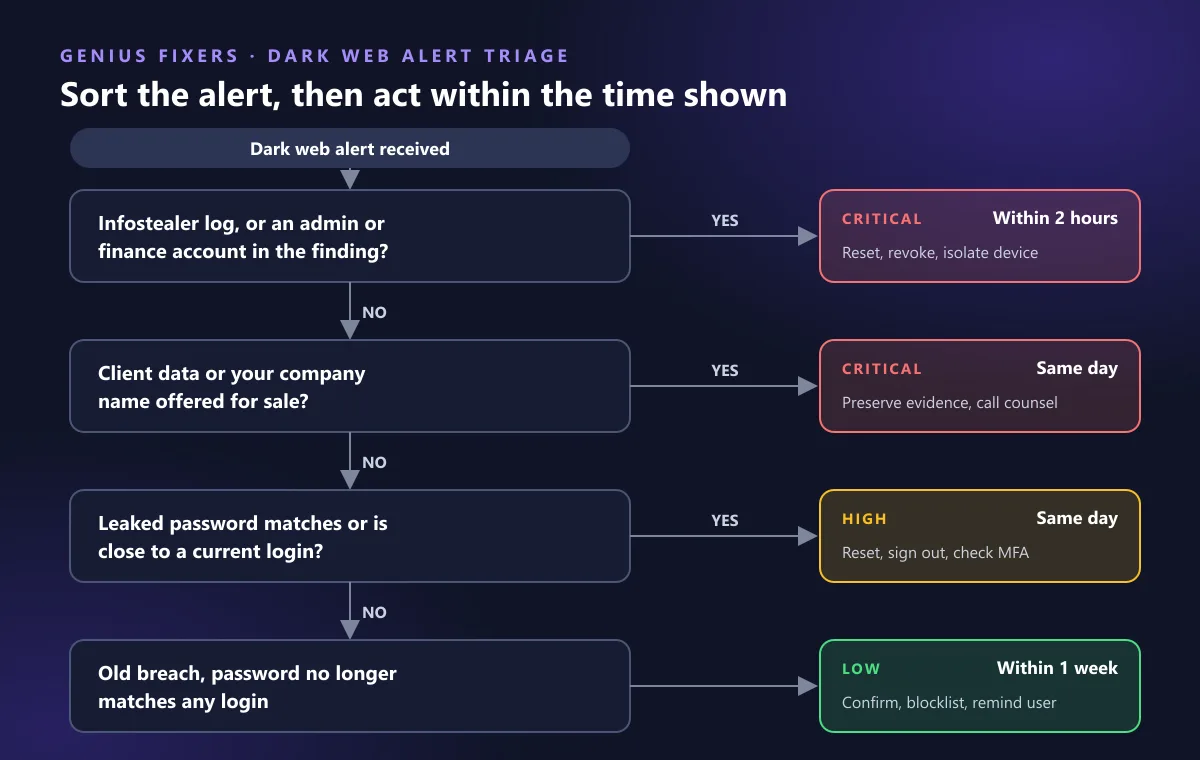
Match the alert to a row and work left to right. The owner column matters because most small offices have no security team.
| Alert | Severity | Do within | Actions | Owner |
|---|---|---|---|---|
| Old breach, password does not match any current login | Low | 1 week | Confirm with the user. Add the password to your blocklist. Remind them not to reuse work passwords. | IT provider |
| Old breach, password matches or is close to a current login | High | Same day | Force a password reset. Sign the user out of all sessions. Confirm MFA is enforced and review recent sign-ins. | IT provider + user |
| Infostealer log tied to a work account | Critical | Within 2 hours | Reset the password and revoke sessions, then find and isolate the infected device. Reset every password saved in that browser, including personal accounts used for work. | IT provider |
| Admin or finance account in any finding | Critical | Within 2 hours | Treat it as an active incident. Check mailbox forwarding rules, new MFA methods and payment change requests. | IT provider + owner |
| Client data or company name for sale | Critical | Same day | Preserve evidence, bring in legal counsel and assess notice duties. Do not contact the seller. | Owner + counsel + IT provider |
The first 24 hours after a high or critical alert
- Reset the password, then revoke sessions. A reset alone leaves stolen session cookies working. NIST SP 800-63B says verifiers shall force a password change when there is evidence of compromise.
- Check MFA on the account. Look for authenticator apps or phone numbers you did not add. Attackers who get in often register their own method first. CISA recommends phishing-resistant MFA wherever you can.
- Review 30 days of sign-ins and mailbox rules. Look for unfamiliar locations, forwarding rules to outside addresses and deleted-items rules that hide replies. These are the setup steps for invoice fraud.
- Investigate the device for infostealer alerts. Run a full scan with your endpoint detection and response tool, or reimage the machine. Our guide on what happens after an EDR alert walks through the steps.
- Do not destroy evidence. The FTC's breach response guide says plainly: do not destroy forensic evidence during investigation and remediation. Export sign-in logs before you reimage anything.
- Write down what you did and when. Your cyber insurer and, if needed, your lawyer will ask for a timeline. See what underwriters expect in our guide to cyber insurance for small businesses.
When a dark web finding becomes a breach notice in Virginia, Maryland and DC
A leaked employee password from someone else's breach is usually not a breach of your systems. But if monitoring shows that data you hold was taken, notice laws may apply. The three jurisdictions we serve treat login credentials differently:
| Jurisdiction | Username/email + password counts as personal information? | Timing language |
|---|---|---|
| Virginia (Va. Code § 18.2-186.6) | Not on its own. A password counts only with a financial account or card number that it unlocks. | Without unreasonable delay. Notify the Attorney General, plus consumer reporting agencies if over 1,000 people get notice at once. |
| Maryland (Com. Law § 14-3501 et seq.) | Yes. A user name or email with a password or security question and answer is listed. | Notify individuals within 45 days after you discover or are notified of the breach. |
| District of Columbia (D.C. Code § 28-3851 et seq.) | Yes. A user name or email with a password, security question and answer, or other authentication is listed. | In the most expedient time possible and without unreasonable delay. Notify the Attorney General if 50 or more DC residents are affected. |
Regulated firms have extra duties on top of these laws. Accounting and tax practices fall under the FTC Safeguards Rule, so see our page on IT for financial services firms. Always confirm notice duties with an attorney.
Free checks vs a managed dark web monitoring service
| Option | What you get | What you still have to do |
|---|---|---|
| Have I Been Pwned (individual email search) | Shows which known breaches include an address | Check every address by hand. No continuous alerts for the whole team. |
| Pwned Passwords check | Free check of a password against known breached passwords. Only the first 5 characters of its SHA-1 hash leave your system. | Wire it into your password policy or tools. |
| Microsoft Entra leaked-credentials detection | Confirmed matches against your current Microsoft 365 passwords. Synced on-premises passwords need password hash synchronization. | Someone has to watch risky-user reports and act on them. |
| Managed dark web monitoring | Continuous domain-wide alerts, including infostealer sources, triaged by a person | Approve resets and answer questions from your IT provider. |
Free checks are worth turning on. The gap is follow-through: a Friday 7 p.m. alert only helps if someone is assigned to act on it. We pair monitoring with phishing prevention training, since most leaked passwords start with reuse or a fake login page.
Make the alerts less frequent and less dangerous
- Use long passphrases plus MFA. NIST SP 800-63B requires at least 15 characters for passwords used as the only factor, and at least 8 when MFA is also used.
- Stop forced 90-day password changes. NIST says verifiers shall not require periodic changes. Change passwords on evidence of compromise instead, which is exactly what monitoring gives you.
- Block breached passwords at the source. NIST requires checking new passwords against a blocklist of commonly used, expected or compromised passwords.
- Keep work logins out of personal browsers. Infostealer logs often come from a family PC where someone saved a work password.
- Work through the rest of our small business cybersecurity checklist once a year.
How Genius Fixers runs dark web monitoring for VA, MD and DC offices
Dark web monitoring for your primary domain is included in our Core IT plan, $125 per workstation per month for 5–10 workstations, along with managed EDR, MFA configuration and cloud identity threat monitoring. We triage each alert against the table above and handle resets, session revocation and device checks. See managed IT pricing for plan details.
Got a dark web alert you are not sure about, or want to know what is already out there for your domain? Book a free 10-minute call with our Manassas team. We work with businesses across Virginia, Maryland and Washington, DC.
Frequently asked questions
What is dark web monitoring?
Dark web monitoring is a service that scans breach dumps, criminal forums, marketplaces and infostealer logs for your company's email addresses, passwords and other data, and alerts you when they appear. It gives you warning so you can reset credentials before they are used.
Is dark web monitoring worth it for a small business?
It is worth it when someone is assigned to act on the alerts. A leaked, still-valid password on an email or finance account is one of the most common ways small offices lose money to invoice fraud, and monitoring is often the first sign.
What should I do if my work email is found on the dark web?
Check whether the leaked password matches any current login. If it does, reset it, sign out all sessions, confirm MFA has no unknown methods and review recent sign-ins. If the finding came from an infostealer log, have the device checked for malware too.
Can you remove your information from the dark web?
No. Once data is copied and traded, nobody can reliably delete it. The fix is to make the leaked data useless by changing passwords, enforcing MFA and watching for misuse.
Does Microsoft 365 include dark web monitoring?
Microsoft Entra ID Protection includes a leaked-credentials detection that flags users whose valid passwords appear in known breaches. Microsoft lists it as nonpremium and confirms matches against current password hashes. It covers Microsoft sign-ins only, not other sites your staff use.
Is a leaked employee password a reportable data breach?
Usually not by itself if it came from a third-party breach. But Maryland and DC count a username or email with a password as personal information, so if credentials you hold were taken, notice duties may apply. Confirm with an attorney.
Sources
- NIST SP 800-63B-4: Authenticators and Verifiers (password requirements)
- Microsoft Learn: Risk detection types in Microsoft Entra ID Protection (Leaked credentials)
- FTC: Data Breach Response, A Guide for Business
- Code of Virginia § 18.2-186.6: Breach of personal information notification
- Maryland Code, Commercial Law § 14-3501: Definitions (personal information)
- Maryland Code, Commercial Law § 14-3504: Breach notification timing
- Code of the District of Columbia § 28-3851: Definitions (personal information)
- Have I Been Pwned: Pwned Passwords and NIST SP 800-63B
- CISA: More than a Password (multifactor authentication)
Last reviewed October 21, 2026 by the Genius Fixers IT Team, Manassas, VA.