Quick answer: a written risk review every year and after major changes
What a HIPAA security risk assessment must cover, how often to do it, a sample risk register and a 2-week plan for small practices in VA, MD and DC.
Find the ePHI, score each risk and fix the top items
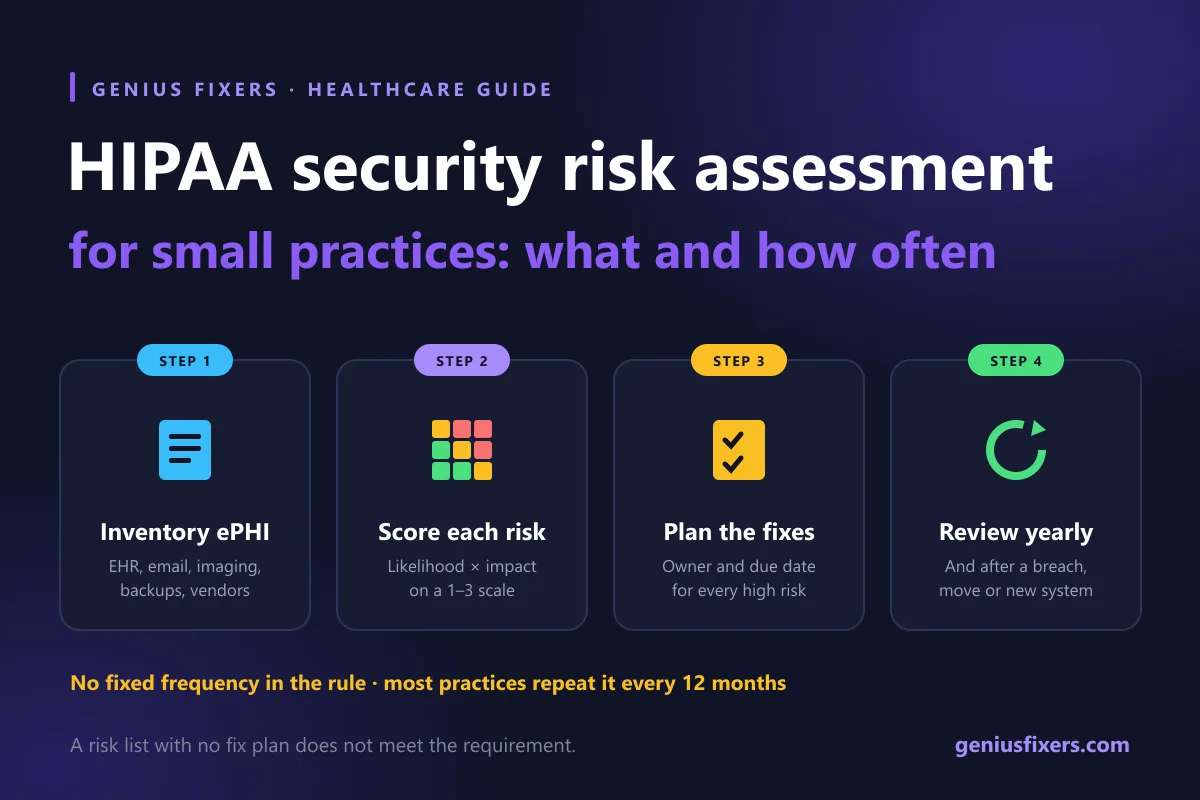
A HIPAA security risk assessment is the written review every covered practice must do to find where electronic patient data lives, what could expose it, how likely and harmful each risk is, and what you will fix. The rule sets no fixed frequency, so most small practices do one every year and again after a breach, a move or a new system.
What the law actually requires
The requirement sits in 45 CFR 164.308(a)(1)(ii)(A). It tells every covered entity and business associate to "conduct an accurate and thorough assessment of the potential risks and vulnerabilities" to the confidentiality, integrity and availability of electronic protected health information (ePHI). The next line requires risk management: putting in place security measures that bring those risks down to a reasonable and appropriate level.
The size of the practice does not change the requirement. A two-dentist office and a hospital both need one. What changes is the scope, and how much work it takes.
What a HIPAA security risk assessment must cover
HHS guidance on risk analysis lists the elements OCR expects to see. In plain terms:
| Element | What it means for a small practice |
|---|---|
| Scope | All ePHI you create, receive, keep or send, on any device or service |
| Data collection | A written list of where ePHI lives and how it moves |
| Threats and vulnerabilities | Realistic threats (phishing, ransomware, lost laptop, flood) and the weak spots they could use |
| Current security measures | What is already in place, and whether it is actually configured and used |
| Likelihood | How probable each threat and weak spot pairing is |
| Impact | How badly it would affect patient data or your ability to see patients |
| Level of risk | A rating for each pairing, with a corrective action for each level |
| Documentation | A written report. No format is required, but it must exist |
| Periodic review | Updates as your practice, systems and threats change |
The ePHI inventory most practices miss
Scope is where most first assessments fall short. Your EHR or practice management system is the obvious one. These are the places we most often find patient data that nobody listed:
- Email. Referrals, lab results and insurance forms in Microsoft 365 or Google Workspace mailboxes.
- Imaging. X-ray, scanner and sensor software, often on one front-desk or operatory PC.
- Scan-to-folder. Copiers that store scanned intake forms on their own hard drive or a shared folder.
- Backups. Local backup drives and cloud backup accounts hold full copies of everything.
- Phones and laptops. Staff texting photos, or doctors charting from home.
- Vendors. Billing companies, answering services and IT providers that can reach your data. Each needs a business associate agreement.
How to score risks: a worked example
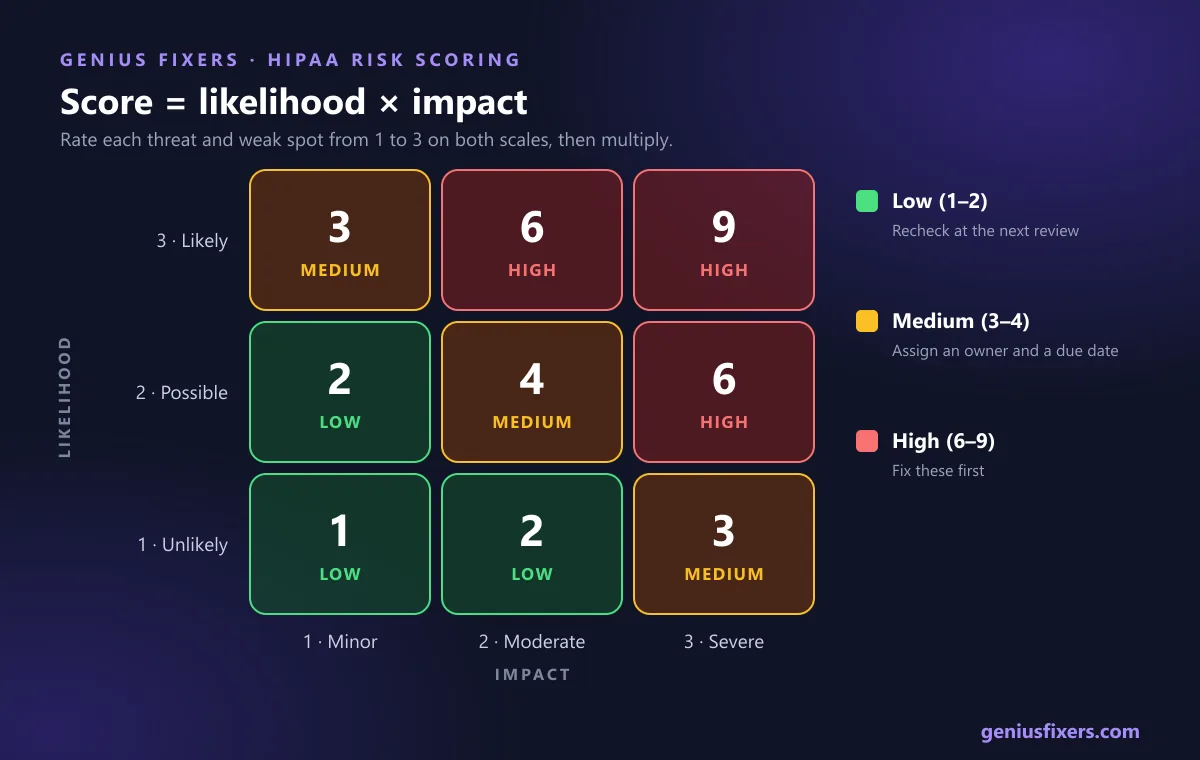
HHS allows any reasonable method, and notes that risk level may be based on the average of likelihood and impact. A simple approach that works for small practices: rate each on a 1 to 3 scale and multiply. A score of 6 to 9 is high, 3 or 4 is medium, and 1 or 2 is low.
Here is a sample risk register for a 12-person family practice in Northern Virginia with a cloud EHR, Microsoft 365 email and one on-site imaging PC:
| Threat and weak spot | Likelihood (1–3) | Impact (1–3) | Score | Action and owner |
|---|---|---|---|---|
| Phishing email steals a staff password; no MFA on email | 3 | 3 | 9 (high) | Turn on MFA for all mailboxes within 30 days. Owner: practice manager and IT |
| Ransomware on imaging PC; backups are on a drive that stays plugged in | 2 | 3 | 6 (high) | Add an off-site, immutable backup and test a restore. Owner: IT |
| Former employee still has EHR login | 2 | 2 | 4 (medium) | Add an offboarding checklist; review users every quarter. Owner: office manager |
| Unencrypted laptop used for charting at home | 1 | 3 | 3 (medium) | Turn on BitLocker and remote wipe. Owner: IT |
| Copier stores scanned forms on internal drive | 1 | 2 | 2 (low) | Confirm data wipe in the lease-return process. Owner: office manager |
The register turns the assessment into a to-do list with names and dates. That second half, the risk management plan, is what the regulation actually asks you to act on. A report that lists risks with no plan to fix them does not meet the requirement.
How often to do a HIPAA security risk assessment
HHS states plainly that the Security Rule does not specify how often to perform a risk analysis. Its guidance says some organizations do one every year and others as needed, for example every two or three years, depending on their circumstances. The rule does require you to keep it current as things change.
Our recommendation for small practices is a full assessment every 12 months, plus a focused update whenever one of these happens:
- A security incident or breach, even a small one
- A new EHR, imaging system, phone system or cloud service
- An office move, a new location or a remodel that changes the network
- A change of ownership or the loss of the person who managed IT
Keep every version. Under 45 CFR 164.316, Security Rule documentation must be kept for 6 years from the date it was created or last in effect, whichever is later.
Risk assessment, vulnerability scan or penetration test?
Practices often buy one of these thinking it covers the others. It does not.
| Review | What it answers | Does it meet the HIPAA risk analysis requirement? |
|---|---|---|
| Security risk assessment | Where is ePHI, what could go wrong, how bad would it be, and what will we fix? | Yes, if it covers all ePHI and is documented |
| Vulnerability scan | Which devices have missing patches or known weaknesses right now? | No. It is useful evidence for the assessment |
| Penetration test | Can a skilled tester actually break in? | No. It is useful evidence for the assessment |
A vulnerability assessment is the fastest way to back your risk ratings with real data instead of guesses.
What the proposed 2025 HIPAA Security Rule changes would add
HHS published a proposed update to the Security Rule in the Federal Register on January 6, 2025. As of this review it has not been finalized, and the federal regulatory agenda does not expect a final action before 2027, so the current rule still applies. If it is finalized as proposed, the HHS fact sheet says practices would need to:
- Keep a written technology asset inventory and network map, reviewed at least every 12 months
- Run a compliance audit at least every 12 months
- Scan for vulnerabilities at least every six months and run a penetration test at least every 12 months
- Use multi-factor authentication and encrypt ePHI at rest and in transit, with limited exceptions
- Have written procedures to restore certain systems and data within 72 hours
A good annual assessment today already builds most of that inventory, so the work is not wasted either way.
A 2-week plan to complete your first assessment
- Days 1–2: Inventory. List every system, device, account and vendor that touches ePHI, using the list above.
- Days 3–4: Gather evidence. Export user lists, MFA status, backup reports, encryption status and signed business associate agreements.
- Days 5–7: Scan. Run a vulnerability scan on every workstation and server.
- Days 8–9: Score. Build the risk register with likelihood, impact and a score for each item.
- Day 10: Plan. Assign an owner and a due date to every high and medium risk.
- Days 11–14: Fix the top three. Start with the highest scores, often multi-factor authentication, tested backup and disaster recovery and phishing training for staff.
The free HHS Security Risk Assessment (SRA) Tool, version 3.7 at the time of writing, can guide the questions. It runs on 64-bit Windows 7, 8, 10 and 11, and an Excel workbook version is available for other systems. It keeps your answers on your own computer. It structures the work, but someone still has to find the ePHI and check each answer.
How Genius Fixers runs risk assessments for practices in Virginia, Maryland and DC
We work from Manassas with healthcare practices and dental offices across Northern Virginia, Maryland and Washington, DC. We build the inventory, run the scans, score the risks with you and deliver a written report and fix-list you can hand to an auditor or a cyber insurer. Our guide to cyber insurance for small businesses covers what underwriters ask.
- Our Complete IT plan includes an annual risk assessment, vulnerability management and phishing training, from $150 per workstation per month. See managed IT pricing.
- On-site visits are $65 within 50 miles of Manassas, Monday to Friday, 8 AM to 5 PM ET.
- We help you build the evidence. We do not certify HIPAA compliance, and no vendor can guarantee it.
Not sure when your practice last did a real risk analysis? Book a free 10-minute call and we'll tell you what your first assessment should cover.
Frequently asked questions
What is a HIPAA security risk assessment?
It is a documented review of where your practice keeps electronic patient data, what threats and weaknesses could expose it, how likely and harmful each one is, and what you will do about it. The HIPAA Security Rule calls it a risk analysis and requires it under 45 CFR 164.308.
How often is a HIPAA risk assessment required?
The Security Rule does not set a fixed frequency. HHS says it must be kept current, and most small practices do a full assessment every year plus an update after a breach, a new system or an office move.
Is the HHS SRA Tool enough to meet HIPAA requirements?
The tool helps structure the questions, but using it does not by itself make you compliant. Your answers still have to cover all the places ePHI lives, and you still need a plan to fix the risks it finds.
Can a small practice do its own HIPAA risk assessment?
Yes. HIPAA does not require an outside firm. Many small practices bring in IT help for the inventory and technical checks, because staff often do not know every place patient data is stored.
How long should we keep HIPAA risk assessment records?
Keep them for 6 years from the date they were created or last in effect, whichever is later. That is the retention rule for Security Rule documentation in 45 CFR 164.316.
What happens if we never did a risk analysis?
OCR treats a missing or incomplete risk analysis as a violation, and it is a common finding after breaches. HHS has announced at least 11 enforcement actions under its Risk Analysis Initiative, including settlements with small practices.
Is the new HIPAA Security Rule final?
Not as of October 2026. HHS proposed the changes on January 6, 2025, the federal regulatory agenda does not expect a final action before 2027, and the current Security Rule remains in effect until a final rule is published.
Sources
- eCFR: 45 CFR 164.308 Administrative safeguards
- eCFR: 45 CFR 164.316 Policies and procedures and documentation requirements
- HHS: Guidance on Risk Analysis Requirements under the HIPAA Security Rule
- HHS: OCR settles HIPAA Security Rule investigation with Top of the World Ranch Treatment Center (Feb 19, 2026)
- HHS: OCR settles HIPAA ransomware investigation with neurology practice
- HHS: HIPAA Security Rule NPRM fact sheet
- Federal Register: HIPAA Security Rule To Strengthen the Cybersecurity of ePHI (proposed rule, Jan 6, 2025)
- HealthIT.gov: Security Risk Assessment (SRA) Tool
Last reviewed October 19, 2026 by the Genius Fixers IT Team, Manassas, VA.