
Quick answer: run two counts and use the larger one
Work out how many wireless access points your office needs with two quick counts, coverage and capacity, plus PoE and cabling math for VA, MD and DC offices.
Coverage first, then capacity
Coverage: divide your floor area by about 1,000 square feet per access point in a walled office, or about 1,500 in open plan. Capacity: divide your expected connected devices by about 30 per access point. Use the larger number, then add one access point for any room that regularly holds 15 or more people. The worked example, placement rules and PoE switch math below show how to turn the count into a plan.
Why one big router stops working past a few rooms
Most small offices start with the Wi-Fi built into the internet provider's router. That works for a suite of three or four rooms. Past that, walls, doors and distance cut the signal, and every laptop, phone and printer shares one radio.
Adding a few access points (APs), wired back to a switch and managed as one network, fixes both problems. The question is how many. Too few leaves dead zones. Too many puts APs on top of each other, where they compete for the same channels and make Wi-Fi worse, not better. If your Wi-Fi already drops, read our guide on why office Wi-Fi keeps dropping before you buy hardware.
How many wireless access points do I need? Run both counts
Most guides give one per-area number or just say “book a survey.” Neither helps you budget. Use two counts, because an office can run out of coverage or out of capacity, and the fix differs.
Count 1: coverage (can every desk get a strong signal?)
Start with the vendor's coverage rating, then discount it for your walls. As an example, Ubiquiti rates its UniFi U7 Pro (a common Wi-Fi 7 office AP) at 1,500 square feet. That figure assumes open space. In a typical office with drywall private offices, glass conference rooms and a steel-framed core, we plan on about 1,000 square feet per AP. Concrete block, brick, elevator shafts, mirrored walls and filing rooms need closer spacing.
Use the signal level real-time apps need as your target. Cisco's Voice over Wireless LAN design guide sets the cell edge at -67 dBm with about 15–20% overlap between neighboring 5 GHz cells, so a laptop or phone can move between APs without dropping a call.
Count 2: capacity (can the APs serve everyone at once?)
Cisco Meraki's documentation lists a theoretical maximum of 1,024 clients for a Wi-Fi 6 AP, then warns that real-world interference keeps the usable number “far lower.” Ubiquiti lists the U7 Pro at 300+ clients. Do not plan around either number. For an office running Microsoft Teams, Zoom and cloud apps, we plan on about 30 active devices per AP, which leaves headroom for video calls and large file syncs.
Count devices, not people: laptops, phones, tablets, guests, wireless printers, room displays and any Wi-Fi sensors.
| Input | Planning figure | Why |
|---|---|---|
| Walled office (drywall, glass, some steel) | 1 AP per ~1,000 sq ft | Interior walls cut signal well below the vendor's open-space rating |
| Open plan or warehouse office area | 1 AP per ~1,500 sq ft | Closer to the vendor rating, but check metal racking separately |
| Devices per staff member | 2.5 | Laptop + phone for everyone, plus a tablet or watch for half |
| Active devices per AP | ~30 | Leaves airtime for video calls; far below theoretical maximums |
| Conference or training room for 15+ | +1 dedicated AP | Everyone joins the same call at once |
| Wi-Fi calling or Wi-Fi desk phones | Cell edge -67 dBm, 15–20% overlap | Cisco VoWLAN design guidance for roaming without drops |
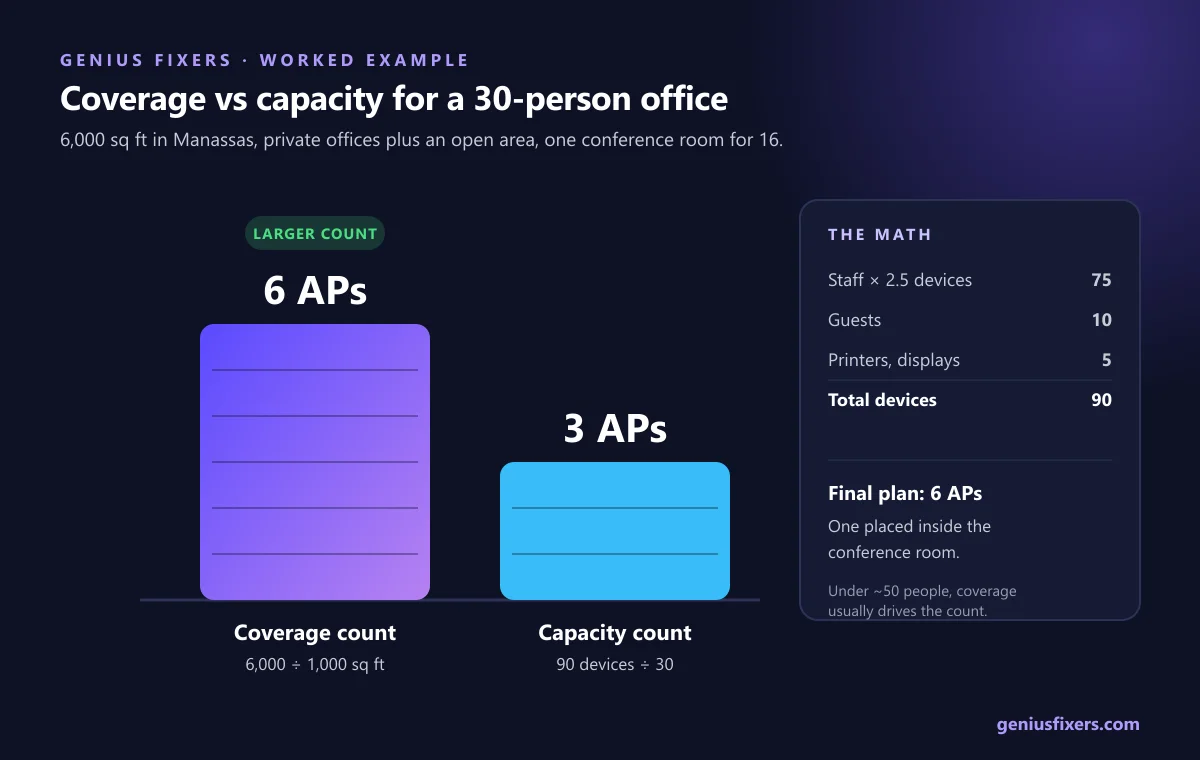
A worked example: a 6,000 sq ft office in Manassas
Here is the math for a common Northern Virginia layout: 6,000 square feet on one floor, 30 staff, a mix of private offices and an open area, one conference room for 16 and a guest lobby.
| Step | Math | Result |
|---|---|---|
| Coverage count | 6,000 sq ft ÷ 1,000 sq ft per AP | 6 APs |
| Devices | 30 staff × 2.5 = 75, plus 10 guests and 5 printers/displays | 90 devices |
| Capacity count | 90 devices ÷ 30 per AP | 3 APs |
| Take the larger count | 6 vs 3 | 6 APs |
| Conference room for 16 | Does an AP already sit in that room? | Place one of the 6 inside it; if not, add 1 |
| Final plan | Coverage-driven | 6 APs, one in the conference room |
In most offices under about 50 people, coverage drives the number, not capacity. The capacity count matters for dense spaces: a training room, a call center floor, a school classroom or a busy waiting room.
Multi-floor office? Size each floor separately and stagger AP positions between floors so APs are not stacked directly above each other on the same channel.
Office Wi-Fi access point placement: where they go matters as much as how many
- Mount on the ceiling, centered in the space they serve. Ceiling APs radiate downward. An AP in a closet, above a metal ceiling grid or behind a monitor loses much of its range.
- Put APs where people work, not in hallways. A hallway AP has to push through two walls to reach anyone. Place them inside the rooms or open areas they cover.
- Keep them away from obstacles. Elevator shafts, electrical rooms, fish tanks, metal shelving and mirrored glass all block or reflect signal.
- Plan the cable first. Each AP needs its own Ethernet run back to a PoE switch. Our structured cabling team pulls and certifies these runs during a build-out, when ceilings are open.
- Turn power down, not up. Running every AP at full power makes laptops cling to a distant AP. Moderate power with more APs roams better.
PoE and switch math most guides skip
Office APs run on Power over Ethernet (PoE), so the switch powers them through the data cable. Check two numbers before you buy: the PoE type per port and the total PoE budget of the switch.
| PoE type | Standard | Power from switch port | Power at the device |
|---|---|---|---|
| Type 1 (PoE) | IEEE 802.3af | 15.4 W | 13 W |
| Type 2 (PoE+) | IEEE 802.3at | 30 W | 25.5 W |
| Type 3 (PoE++) | IEEE 802.3bt | 60 W | 51 W |
| Type 4 (PoE++) | IEEE 802.3bt | 90 W | 71.3 W |
Ubiquiti lists the U7 Pro at 21 W maximum on PoE+, so a basic 802.3af port will not run it at full capability. For the six-AP example, budget for 6 × 30 W = 180 W at the switch to cover each PoE+ port's worst case. Then add any PoE cameras and desk phones. If you are adding cameras too, see our business security camera installation page, because cameras and APs usually share the same switch.
Also match the uplink. The U7 Pro has a 2.5 GbE port. On a 1 GbE switch port it still works, but you cap the AP below what its radios can deliver. Mount the switch in a ventilated rack; see our server rack and patch panel setup service.
Do you need Wi-Fi 7 access points in 2026?
The Wi-Fi Alliance launched Wi-Fi CERTIFIED 7 on January 8, 2024. Its headline features are 320 MHz channels, which are only available where the 6 GHz band is open to Wi-Fi, and Multi-Link Operation, which lets a device use more than one band at once. Both only help when the laptop or phone supports Wi-Fi 7 too.
For a new install, buying Wi-Fi 7 APs is reasonable because APs stay in the ceiling for years and your next laptops will support it. It does not change the count. Plan the number of APs on the same coverage and capacity math, because 6 GHz signals do not travel farther through walls than 5 GHz.
When to skip the math and get a wireless site survey
The two counts are enough to budget. A wireless site survey, where an engineer measures real signal on a floor plan, is worth it when:
- The building has concrete, brick, plaster-and-lath or lots of metal (older Old Town Manassas, Alexandria and Frederick buildings often do).
- You run Wi-Fi phones, handheld scanners or medical devices that must roam without dropping.
- You are covering a warehouse, a multi-tenant floor with heavy neighbor interference, or outdoor space.
How Genius Fixers sizes and installs office Wi-Fi in Virginia, Maryland and DC
We plan and install access points for offices across Northern Virginia, Maryland and Washington, DC from our base in Manassas. A typical project covers the floor plan review, AP count and placement, cabling, PoE switch sizing, separate staff and guest networks, and configuration. See our wireless access point installation service for scope.
- After install, network monitoring and management watches AP health and client counts so you see capacity problems before staff do.
- On-site support is $65 per visit within 50 miles of Manassas.
- Core IT starts at $125 per workstation per month and includes network monitoring. A cloud-managed Wi-Fi router subscription is $30 per router per month, with router hardware purchased separately. See managed IT pricing.
Send us your floor plan and headcount
We'll give you an AP count and a cabling plan. Book a free 10-minute call (Mon–Fri, 8–5 ET).
Call 703-419-9000 or 1-800-949-6592 to plan your office Wi-Fi.
Frequently asked questions
How many wireless access points do I need for 5,000 square feet?
Plan on about five access points for a 5,000 square foot office with private offices and interior walls, or three to four for an open-plan space. Add one if a conference room regularly holds 15 or more people.
How many devices can one wireless access point handle?
Vendor spec sheets list 300 or more clients, but those are theoretical limits. For an office running video calls and cloud apps, plan on about 30 active devices per access point.
How far apart should office access points be?
In a typical walled office, access points usually end up 30 to 40 feet apart. The goal is a signal of -67 dBm or better at every desk with 15–20% overlap between neighboring APs.
Can you have too many access points?
Yes. Access points placed too close together on the same channels interfere with each other, and devices hold onto a distant AP instead of roaming. More APs at lower power works better than many APs at full power.
Do wireless access points need to be hardwired?
For office use, yes. Each access point should have its own Ethernet cable back to a PoE switch, which carries both data and power. Wireless mesh backhaul cuts throughput and is best kept for spots where cable cannot reach.
What PoE do I need for a Wi-Fi 7 access point?
Most office Wi-Fi 7 access points need PoE+ (IEEE 802.3at), which delivers 25.5 W at the device. Check the AP's spec sheet, and size the switch's total PoE budget for every AP, camera and phone it powers.
Do I need a wireless site survey for a small office?
Not always. A simple drywall office can be sized from floor area and device counts. Get a survey if the building has concrete or metal, if you use Wi-Fi phones or scanners, or if your current Wi-Fi has failed without a clear cause.
Sources
- Ubiquiti: UniFi U7 Pro technical specifications
- Cisco Meraki Documentation: Approximating Maximum Clients per Access Point
- Cisco: Voice over Wireless LAN 4.1 Design Guide, Chapter 3
- Ethernet Alliance: Overview of IEEE 802.3bt Power over Ethernet
- Wi-Fi Alliance: Wi-Fi Alliance introduces Wi-Fi CERTIFIED 7
Last reviewed October 15, 2026 by the Genius Fixers IT Team, Manassas, VA.