Quick answer: upgrade when the router is end of life or the office holds client data
When a small office outgrows its ISP router, how to size a managed firewall so security features don't slow your internet, and what it costs in VA, MD and DC.
Size the firewall by threat protection throughput, not the headline number
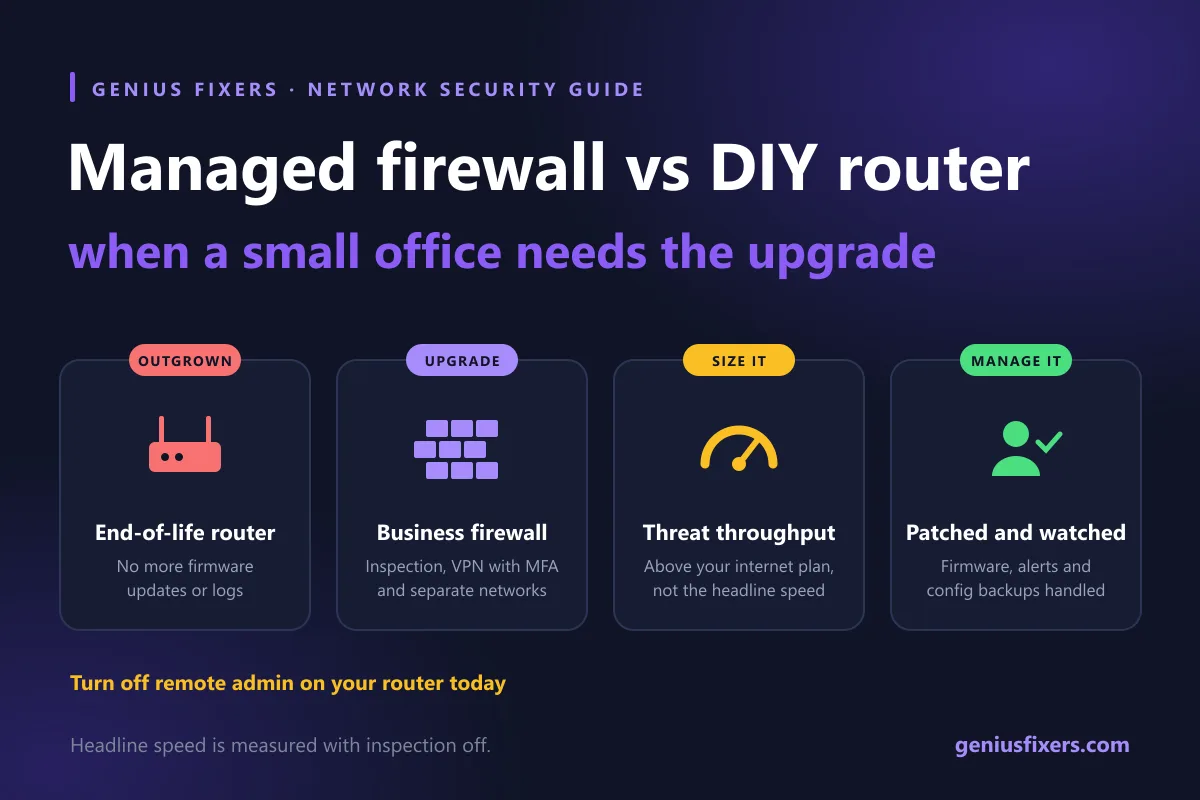
A managed firewall is a business-grade firewall that an IT provider configures, patches, monitors and backs up for you. A small office needs one instead of a DIY or ISP router once it handles client data, takes card payments, has remote staff on VPN, or runs a router that no longer gets firmware updates. Size it by its threat protection throughput, not its headline speed.
What a managed firewall does that your router does not
Most small offices run on the box the internet provider installed, or a consumer router bought at a big-box store. Both route traffic and block unsolicited inbound connections. That is where their protection stops.
A business firewall adds inspection: it looks inside traffic for known attacks, blocks malicious sites, controls which apps can reach the internet and keeps logs. A managed service adds the people: someone updates its firmware, reviews its rules, watches its alerts and restores its configuration if the hardware dies. Without that upkeep, a good firewall ends up running two-year-old firmware with nobody reading the alerts.
| Capability | ISP gateway or consumer router | Business firewall you run yourself | Provider-managed firewall |
|---|---|---|---|
| Basic routing and NAT | Yes | Yes | Yes |
| Intrusion prevention and malware blocking | Rarely | Yes, if licensed and turned on | Yes, licensed, tuned and monitored |
| Web and app filtering by category | Basic or none | Yes | Yes, with policies set for your office |
| Separate networks for guests, cameras and staff (VLANs) | Guest Wi-Fi only, usually | Yes | Yes, designed with your cabling and access points |
| Site-to-site and remote-access VPN | Limited | Yes | Yes, tied to MFA |
| Firmware patching | Whenever someone remembers | Your job | Provider's job, on a schedule |
| Logs and alerts | Few, rarely read | Available, often unread | Reviewed, with alerts going to a person |
| Config backup and hardware replacement | None | Your job | Included in the process |
Five signs your office has outgrown its router
- The router is end of life. The FBI's May 2025 public service announcement warned that criminals are taking over end-of-life routers, which no longer get security patches, and selling access as proxy services. A variant of TheMoon malware, which does not need a password, has been infecting end-of-life routers that have remote administration turned on. Look up your model on the manufacturer's support page. If firmware updates have stopped, replace it.
- You hold regulated data. Patient records, client tax files or card payments come with written security expectations. A consumer router gives you no logs to prove anything to an auditor or insurer.
- Staff connect from home. Remote access through port forwarding or a free VPN on a consumer router is a common way in. A business firewall gives you a VPN that works with multi-factor authentication.
- Cameras, printers and guests share the staff network. These devices are hard to patch. They belong on their own network segment, which most consumer routers cannot create.
- Nobody knows the admin password. If the person who set it up left years ago, the box is unmanaged by definition.
Sizing a business firewall: the throughput number that matters
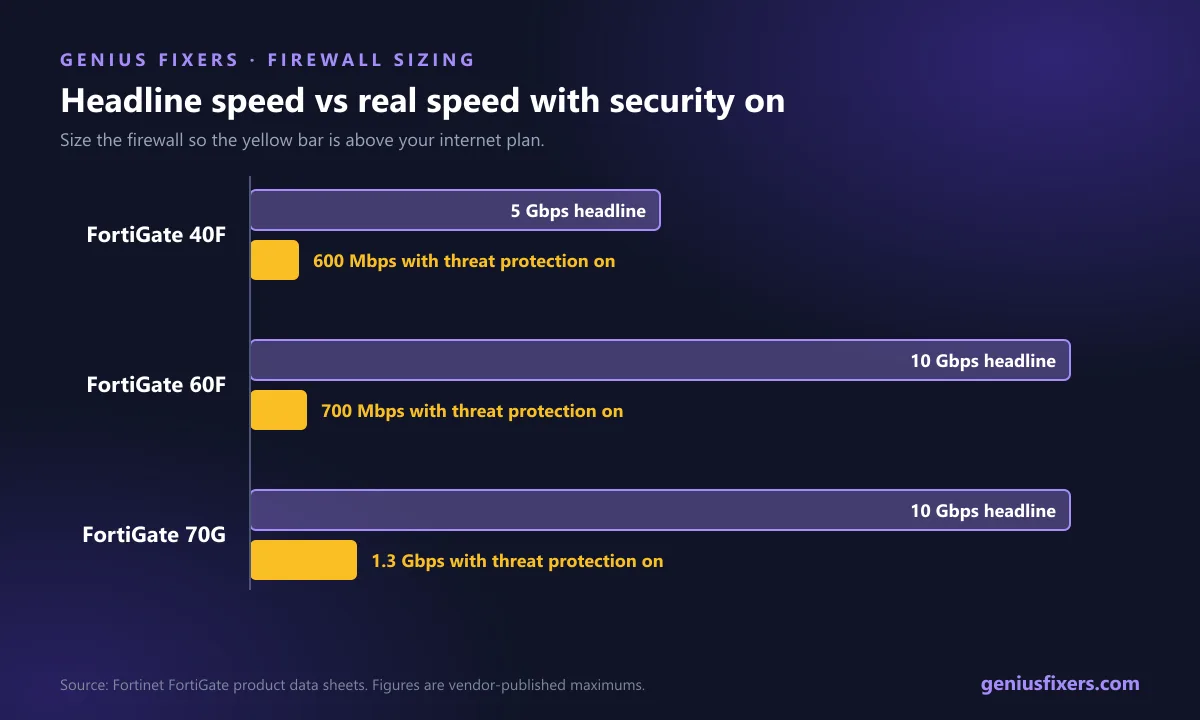
This is the mistake most buying guides skip. Every firewall data sheet leads with its raw firewall throughput, measured with all inspection turned off. Turn on the security features you are paying for, and real throughput drops sharply.
| Model | Firewall throughput (headline) | NGFW throughput | Threat protection throughput |
|---|---|---|---|
| FortiGate 40F | 5 Gbps | 800 Mbps | 600 Mbps |
| FortiGate 60F | 10 Gbps | 1 Gbps | 700 Mbps |
| FortiGate 70G | 10 Gbps | 1.5 Gbps | 1.3 Gbps |
Here is the math in practice. An office that just upgraded to a 1 Gbps fiber circuit and installs a FortiGate 40F will see its internet cap out around 600 Mbps once intrusion prevention, application control and malware scanning are on. The same office on a 300 Mbps cable plan would never notice. Other brands publish similar figures under different names, so compare the number measured with full threat protection on.
| Office | Typical internet plan | Threat protection throughput to look for |
|---|---|---|
| 5–15 users, one site | Up to 500 Mbps | At least your plan speed, so 500 Mbps or more |
| 15–40 users, cloud apps and video calls all day | 500 Mbps to 1 Gbps | 1 Gbps or more |
| 40–100 users, or two sites with a VPN between them | 1 Gbps or more | Above your plan speed, plus IPsec VPN headroom for the site link |
Leave room to grow. Firewalls usually stay in service for years, and offices rarely move to a slower internet plan.
What it costs: DIY vs managed
| Option | What you pay | Hidden cost |
|---|---|---|
| Keep the ISP or consumer router | Nothing extra | No inspection, no logs. End-of-life models stop getting patches. |
| Buy a business firewall and run it yourself | Hardware plus annual security subscriptions | Someone has to patch it, read alerts and renew licenses. At pay-as-you-go rates of $150 per hour, a few hours of troubleshooting quickly adds up. |
| Genius Fixers firewall management | $99 per firewall per month, added to a managed IT plan | Hardware and security licenses are quoted separately. |
For context, our Core IT plan, from $125 per workstation per month, already includes network monitoring and management and managed EDR. The firewall is an add-on, so offices that do not need one do not pay for it. See the full breakdown on our managed IT pricing page.
What a good firewall management service includes
- A written rule set. Every allowed inbound rule has a reason and an owner. NIST SP 800-41 recommends establishing a firewall policy, then selecting, configuring, testing, deploying and managing the firewall.
- Firmware on a schedule. Updates are tested and applied in a maintenance window, not whenever someone remembers.
- Segmented networks. Staff, guests, cameras and payment terminals each get their own segment. Pair this with properly placed wireless access points so Wi-Fi follows the same design.
- Alerts that reach a person. Repeated blocked attacks, VPN logins from new countries and config changes should open a ticket. For deeper visibility, add intrusion detection and response.
- Remote admin locked down. The management page is reachable only from inside the network or through the provider's secure management platform, never from the open internet.
- Config backups and a spare plan. If the unit fails, a replacement is loaded with the saved config, so the office is back online the same day.
A 30-minute check you can run on your current router
- Find the exact model on the label and check the manufacturer's support page for end-of-life status and the latest firmware date.
- Log in to the admin page and confirm remote management (WAN-side admin) is off.
- Change the admin password to a unique, random password. The FBI recommends 16 to 64 characters.
- Check for port forwards you do not recognize and remove them.
- Confirm guest Wi-Fi is isolated from the staff network.
- Write down what you found. If any step failed or the router is end of life, it is time to upgrade.
If your Wi-Fi is also unreliable, the firewall may not be the problem. Our guide on why office Wi-Fi keeps dropping covers the usual causes. A firewall is also one layer of a broader approach. See how it fits into zero trust for growing businesses.
How Genius Fixers installs and manages firewalls in VA, MD and DC
We plan the rule set and network segments first, then schedule the swap after hours so nobody loses internet during the workday. Our technicians handle the install in person through on-site support, at $65 per visit within 50 miles of our Manassas office. After that, we monitor, patch and back up the firewall remotely.
Not sure if your router is end of life, or which firewall fits your internet speed? Book a free 10-minute call and we will tell you what to keep and what to replace. We serve businesses across Virginia, Maryland and Washington, DC.
Frequently asked questions
What is a managed firewall?
It is a business firewall that an IT provider sets up, patches, monitors and backs up on your behalf. You get the protection of the hardware plus the ongoing upkeep that keeps it effective.
Is a router a firewall?
Most routers include a basic firewall that blocks unsolicited inbound traffic. They usually lack intrusion prevention, malware and web filtering, network segmentation, detailed logs and a regular patch process, which a business firewall provides.
Does a small business need a firewall?
Yes. Every office needs at least basic firewall protection, and most offices that handle client data, take card payments or support remote workers need a business firewall that someone actively manages.
How much does a managed firewall cost?
Genius Fixers offers firewall management as a $99 per firewall per month add-on to its managed IT plans, with hardware and licenses quoted separately. Other providers price differently, so compare what hardware, security licenses and monitoring each quote includes.
Will a firewall slow down my internet?
It can if it is undersized. Security inspection reduces throughput, so a firewall rated at 5 Gbps may pass only about 600 Mbps with full threat protection on. Choose a model whose threat protection throughput exceeds your internet plan.
How do I know if my router is end of life?
Check the manufacturer's support page for your exact model. If it is listed as end of life, discontinued or has had no firmware update for a long time, replace it, as the FBI recommends.
Can I keep my ISP's modem if I add a business firewall?
Usually yes. The ISP device is often set to bridge or passthrough mode so the firewall handles routing and security, which avoids two layers of address translation.
Sources
- FBI IC3 PSA I-050725-PSA: Cyber criminals target end-of-life routers (May 7, 2025)
- CISA and FBI: Secure by Design Alert for SOHO device manufacturers (January 31, 2024)
- CISA: Secure by Design Alert, Security Design Improvements for SOHO Device Manufacturers
- Fortinet: FortiGate Network Security Platform product matrix (throughput figures)
- NIST SP 800-41 Rev. 1: Guidelines on Firewalls and Firewall Policy
Last reviewed October 22, 2026 by the Genius Fixers IT Team, Manassas, VA.