Quick answer: verify every payment change before money moves
BEC cost US businesses $3.05 billion in 2025. Learn how invoice fraud works, the payment-change callback rule, key Microsoft 365 settings and a first-hour plan.
The fix is procedural and technical
Business email compromise (BEC) is a scam where a criminal sends or hijacks a trusted email, usually from a vendor, executive or client, to redirect a payment. The FBI's IC3 logged 24,768 BEC complaints and $3.05 billion in losses in 2025. Verify every payment change by phone using a number you already had, use phishing-resistant MFA, block automatic external forwarding and enforce DMARC. The callback rule, Microsoft 365 checklist and first-hour response plan below show how.
How a BEC scam actually reaches a small office
Most small-office cases follow the same path. An attacker phishes one mailbox, often the owner, the bookkeeper or a vendor's accounts-receivable clerk. They sign in quietly, create an inbox rule that hides replies, and read mail for days or weeks. When a real invoice is due, they reply in the existing thread with "updated banking details." The email is not fake. It comes from the real account, in the real conversation, so it passes every spam filter.
That is why training people to spot typos is not enough. The FBI lists the common variants: a vendor invoice with a new bank account, a CEO asking for gift cards, and fake wire instructions on a real estate closing. All three end with money sent to an account the attacker controls.
| Pattern | What arrives | Who it targets | Control that stops it |
|---|---|---|---|
| Vendor email compromise | A real supplier's mailbox sends "new remit-to" bank details on a real invoice | Bookkeepers, AP clerks | Callback to a number already on file before any bank change |
| Executive impersonation | "Are you at your desk? I need gift cards / a quick wire" from the owner's name | Office managers, new hires | Written rule: no payment or gift card request is approved by email alone |
| Closing / settlement wire fraud | Spoofed title company or attorney sends changed wiring instructions days before closing | Real estate, law firms, their clients | Verbal confirmation of wiring instructions using a number from the engagement letter |
| Payroll diversion | An "employee" asks HR to change their direct deposit account | HR, payroll | Bank changes only through the payroll portal plus a call to the employee |
What business email compromise costs: the 2025 numbers
The FBI Internet Crime Complaint Center's 2025 report counted 24,768 BEC complaints with $3,046,598,558 in reported losses. Divide one by the other and the average reported BEC loss works out to about $123,000 per complaint.
The same report shows how busy our region is for internet crime overall (all crime types, not BEC alone):
| Jurisdiction | Complaints | Reported losses |
|---|---|---|
| Virginia | 25,314 | $476,120,025 |
| Maryland | 19,430 | $390,242,821 |
| Washington, DC | 3,113 | $97,368,097 |
There is one hopeful number. In 2025 the IC3 Recovery Asset Team worked 3,900 Financial Fraud Kill Chain incidents covering $1.16 billion in attempted theft and froze $679 million, a 58% success rate. Freezes depend on speed, which is why the response plan below is measured in minutes.
Business email compromise prevention: the payment-change callback rule
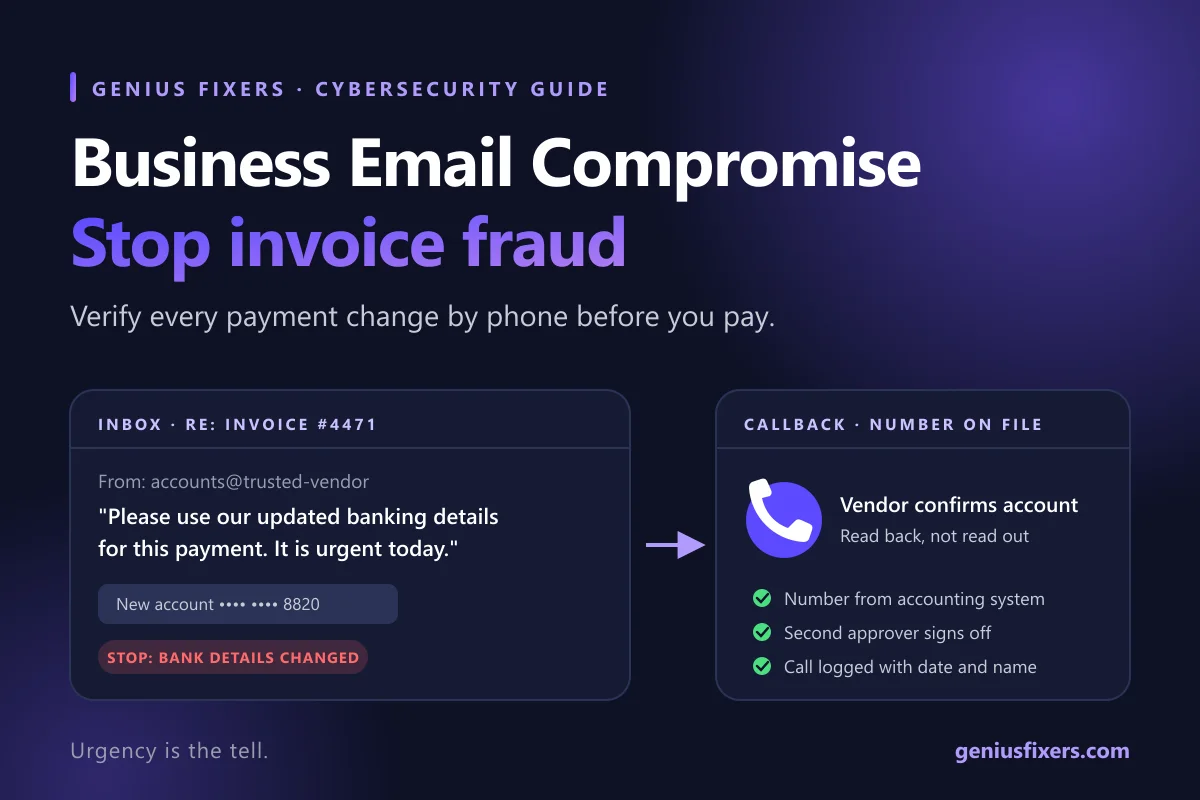
If you adopt one control this week, make it this one. It costs nothing and it stops the most expensive pattern, invoice fraud through a compromised vendor. Write it down, get the owner to sign it, and give it to everyone who can move money.
- Any change to bank details is a stop event. New account, new routing number, "our bank changed," or "use this account just this once" all count. No payment goes out on new details until steps 2–4 are done.
- Call a number you already had. Use the phone number in your accounting system, contract or a past paper invoice. Never use a number, link or signature block from the email that asked for the change.
- Ask the vendor to confirm, not you. Say "Can you read me the account number you expect us to use?" rather than reading yours out for a yes.
- Second approver for changes and large payments. Pick a dollar threshold that fits your business. Above it, a second person signs off. In a three-person office, the owner is the second approver and a named backup covers vacations.
- Log it. Record the date, who called, the number used and who confirmed. Auditors, banks and cyber insurers will ask for this after an incident.
Urgency is the tell. Requests to skip the process because "the CEO is boarding a flight" or "the closing is today" are exactly when the callback matters most. The FBI's own guidance says to be especially cautious when someone pressures you to act quickly.
Microsoft 365 settings that block the takeover
The callback rule protects payments. These settings protect the mailbox the attacker needs. Most can be checked in an afternoon by whoever administers your tenant.
| Setting | Where | Target state |
|---|---|---|
| MFA for every account, including shared and admin | Microsoft Entra ID (Conditional Access or security defaults) | On for 100% of sign-ins; prefer app-based or phishing-resistant methods over SMS |
| Automatic external forwarding | Defender outbound spam policy | Explicitly set to Off - Forwarding is disabled, not left on the system-controlled default |
| Hidden inbox rules | Exchange Online PowerShell | Review monthly with Get-InboxRule -Mailbox user@domain -IncludeHidden |
| DMARC on your domain | Public DNS (_dmarc TXT record) | Move from p=none to p=quarantine to p=reject after reviewing reports |
| External sender tag | Exchange Online | On, so lookalike domains show an "External" warning |
| Sign-in alerts | Entra ID sign-in logs or your MDR | Alerts for impossible travel and new-country sign-ins |
With forwarding set to Off, any inbox rule that redirects mail to an outside address simply bounces with error 5.7.520, which shuts down the most common way attackers keep a copy of your conversations. Our MFA management service rolls out and enforces these controls across every user, and our phishing prevention training runs realistic BEC simulations so staff practice the callback before it is real.
Stolen passwords are often how the first mailbox falls. Dark web monitoring flags staff credentials that show up in breach dumps so you can reset them before someone tries them.
The first 60 minutes after a fraudulent payment
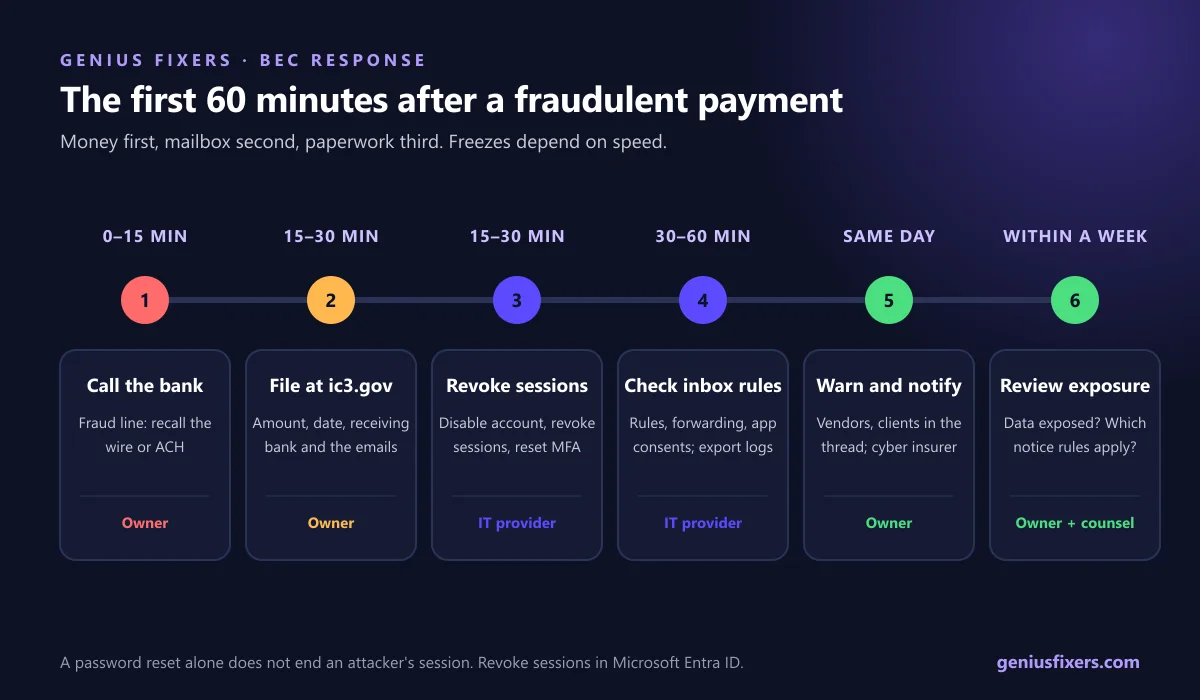
Print this and tape it next to the bookkeeper's monitor. The order matters: money first, mailbox second, paperwork third.
| When | Action | Owner |
|---|---|---|
| Minute 0–15 | Call your bank's fraud line. Ask them to recall the wire or ACH and contact the receiving bank. | Owner or controller |
| Minute 15–30 | File a complaint at ic3.gov with the amount, date, receiving bank, account number and the emails. | Owner |
| Minute 15–30 | Disable the compromised account and select Revoke sessions in the Microsoft Entra admin center, then reset the password and MFA. | IT provider |
| Minute 30–60 | Check that mailbox for inbox rules, forwarding and app consents. Export the message trace and sign-in logs before deleting anything. | IT provider |
| Same day | Warn vendors and clients that came through the hijacked thread. Notify your cyber insurer. | Owner |
| Within a week | Review whether personal or client data was exposed and what notification rules apply to you. | Owner with counsel |
Revoking sessions matters because a password reset alone does not end an attacker's existing sign-in. Microsoft notes that access tokens stay valid until they expire, one hour by default, unless sessions are revoked. If you have an intrusion detection and response service, its team should run steps 3 and 4 for you.
Industries in the DMV with extra exposure
- Accounting, tax and financial advisory firms. They move client money and hold tax data. The FTC Safeguards Rule names tax preparation firms as covered and requires a written information security program, MFA and staff security training. See our IT for financial services firms.
- Real estate and title. Closing wire fraud is the classic BEC case. Brokerages should send clients a written "we will never change wiring instructions by email" notice at contract. Read more about IT for real estate offices.
- Law firms. Settlement payouts and trust accounts are targets, and attorney impersonation is a named BEC variant. Our law firm IT support covers mailbox hardening alongside matter permissions.
Ask your cyber insurer whether your policy covers social engineering or funds transfer fraud. It is often a separate, sub-limited coverage, and many carriers require callback verification to pay a claim. Our guide to cyber insurance for small businesses lists the questions underwriters ask. For the wider baseline, work through our small business cybersecurity checklist.
How Genius Fixers protects offices in Virginia, Maryland and DC
From our office in Manassas, we set up the controls above for businesses across Northern Virginia, Maryland and Washington, DC. That includes MFA on every account, forwarding blocked, DMARC moved to enforcement, monthly inbox-rule reviews and a written payment-change policy your team can follow.
- Core IT starts at $125 per workstation per month and includes email security, MFA configuration, cloud identity threat monitoring and dark web monitoring for your primary domain.
- Complete IT starts at $150 per workstation per month and adds phishing training, vulnerability management and an annual risk assessment. Compare plans on our managed IT pricing page.
Want a second set of eyes on your Microsoft 365 tenant and payment process?
Book a free 10-minute call and we'll tell you which BEC controls you're missing.
Call 703-419-9000 or 1-800-949-6592 to review your BEC controls.
Frequently asked questions
What is a BEC scam?
A BEC scam is fraud where a criminal uses a hijacked or spoofed business email account to trick someone into sending money or sensitive data. Common versions are fake vendor invoices with new bank details, fake CEO requests for gift cards or wires, and fake closing wire instructions.
How much did BEC cost US businesses in 2025?
The FBI's IC3 2025 Internet Crime Report recorded 24,768 BEC complaints and $3,046,598,558 in reported losses. That averages about $123,000 per complaint.
How do you prevent invoice fraud from a compromised vendor?
Treat every change to a vendor's bank details as a stop event and confirm it by calling a phone number you already had on file, never one from the email. Add a second approver for bank changes and large payments, and log every verification call.
Can you get money back after wire transfer fraud?
Sometimes, if you act fast. Call your bank's fraud line immediately to request a recall, then file at ic3.gov. In 2025 the IC3 Recovery Asset Team froze $679 million of $1.16 billion in attempted theft, a 58% success rate.
Does MFA stop BEC?
MFA blocks most password-only takeovers of your own mailboxes, but it does not stop a compromised vendor from emailing you. You still need the callback rule for payment changes, and phishing-resistant MFA methods are stronger than SMS codes.
Who should a small business report BEC to?
Report it to your bank first, then to the FBI's Internet Crime Complaint Center at ic3.gov. Also notify your cyber insurer and any vendors or clients whose email threads were involved.
How do I check Microsoft 365 for malicious inbox rules?
In Exchange Online PowerShell, run Get-InboxRule -Mailbox followed by the user's address and add -IncludeHidden to show hidden rules. Look for rules that move, delete or forward messages containing words like invoice, payment or wire.
Plan your next authentication improvement
Use our Microsoft 365 passkey rollout checklist to plan enrollment, application testing and account recovery before enforcing phishing-resistant MFA.
Sources
- FBI IC3: 2025 Internet Crime Report (PDF)
- FBI: Business Email Compromise
- Microsoft Learn: Control automatic external email forwarding
- Microsoft Learn: Get-InboxRule (Exchange PowerShell)
- Microsoft Learn: Revoke user access in Microsoft Entra ID
- Microsoft Learn: Set up DMARC to validate the From address
- FTC: FTC Safeguards Rule: What Your Business Needs to Know
Last reviewed October 9, 2026 by the Genius Fixers IT Team, Manassas, VA.